Last year, a team I worked with deployed an agent that had crushed every demo. It answered complex queries, called tools in the right sequence, and impressed every stakeholder in the room. Then it hit production. At 3 AM on a Tuesday, that same agent entered a retry loop against a flaky API, burned through $400 in API calls, and produced nothing useful. The model was fine. The prompt was fine. The agent harness, the infrastructure wrapping that model, didn’t exist in any meaningful sense.
This story isn’t unusual. It’s the norm. There’s an industry saying that captures why: “The model is commodity. The harness is moat.”
The gap between an agent that demos well and one that runs reliably in production is almost entirely a harness engineering problem. This guide covers what an agent harness is, the six core components every harness needs, why 2026 is the year harness design eclipsed model selection, and how to start building one. Whether you’re a platform engineer evaluating agent infrastructure or a technical leader making build-vs-buy decisions, this is the foundation.
Listen to This Article
Prefer listening? Two AI hosts discuss the gap between demo agents and production agents, and why agent harness engineering bridges it — in a 21-minute deep dive.
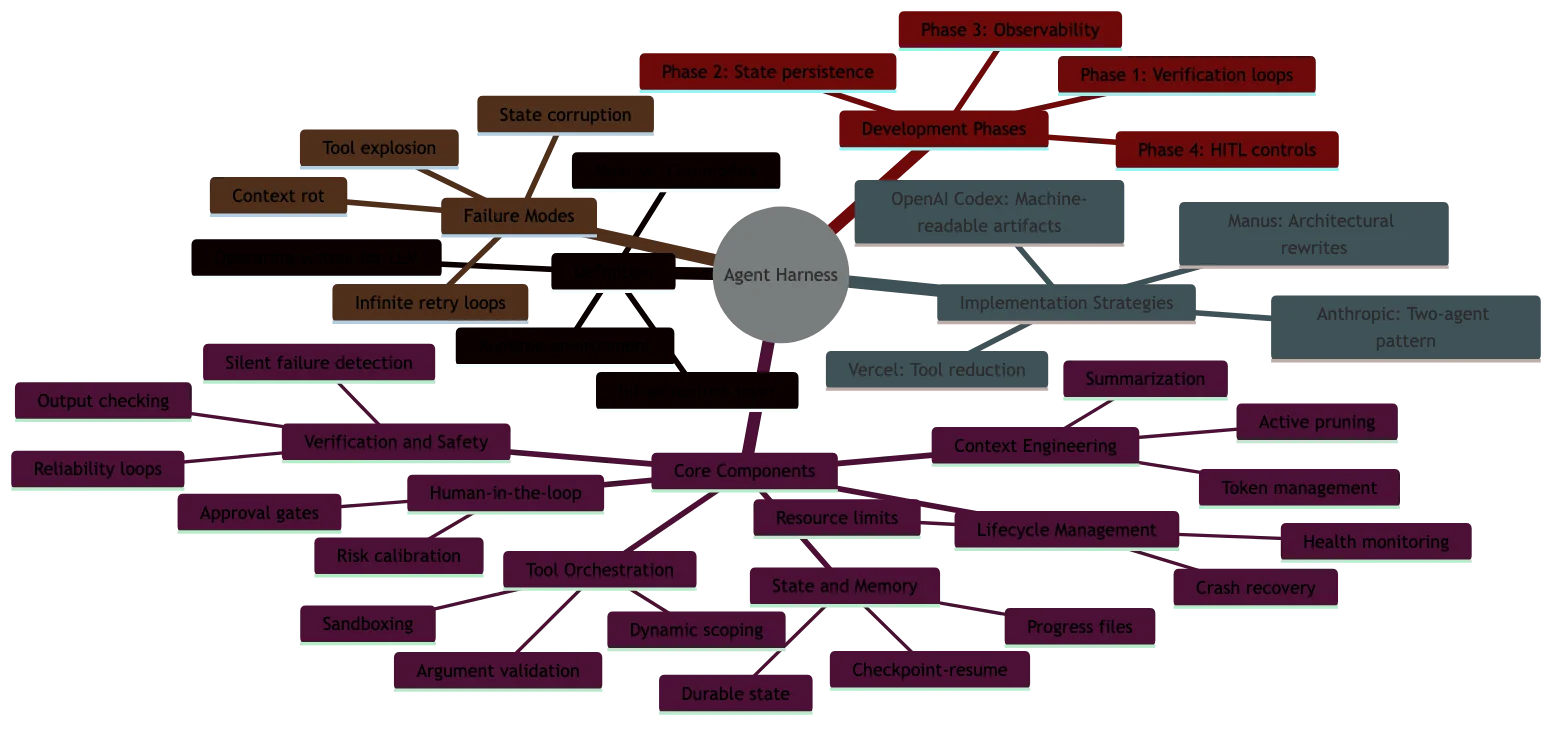
Interactive Concept Map
Click any node to expand or collapse. Use the controls to zoom, fit to view, or go fullscreen.
What is an agent harness?
An agent harness is the infrastructure layer that wraps an AI model and manages its lifecycle, context, tool access, verification, and safety in production. The model generates text. The harness decides what the model sees, what it can do, when it should stop, and what happens when things go wrong.
Think of it through the horse tack metaphor that’s become popular in the field. The Large Language Model (LLM) is a powerful horse, enormous raw capability, but no sense of direction, no understanding of boundaries, and no concept of “stop.” The harness is the bridle, reins, and saddle. It channels that power into controlled, useful work. Without it, the horse runs wherever it wants.
Phil Schmid from Hugging Face offers another framing: the model is the CPU, and the harness is the operating system. The CPU executes instructions, but the OS manages memory, schedules processes, handles I/O, enforces permissions, and recovers from crashes. A CPU without an OS is a heating element. A model without a harness is a demo.
One distinction matters early: a framework is the blueprint, and a harness is the factory floor. LangChain gives you components to assemble an agent. The harness is the runtime environment that governs how that agent executes, what context it receives at each step, how tool calls are verified, what happens when a step fails, and when a human gets paged.
You can see this concretely with Anthropic’s Claude. The same Claude model powers a chat interface, Claude Code (a terminal-based coding agent), and enterprise API integrations. Same weights. Radically different behavior. The difference is the harness. Claude Code’s harness manages file system access, terminal sessions, verification loops, and multi-session state. The chat harness manages conversation history and safety filters. The model doesn’t change. The agent harness architecture surrounding it changes everything.
Why agent harnesses matter in 2026
If 2025 was the year of the agent, 2026 is the year of the harness. The industry discovered, painfully, that building an agent is the easy part. Making it reliable, cost-predictable, and safe in production is where the real engineering happens.
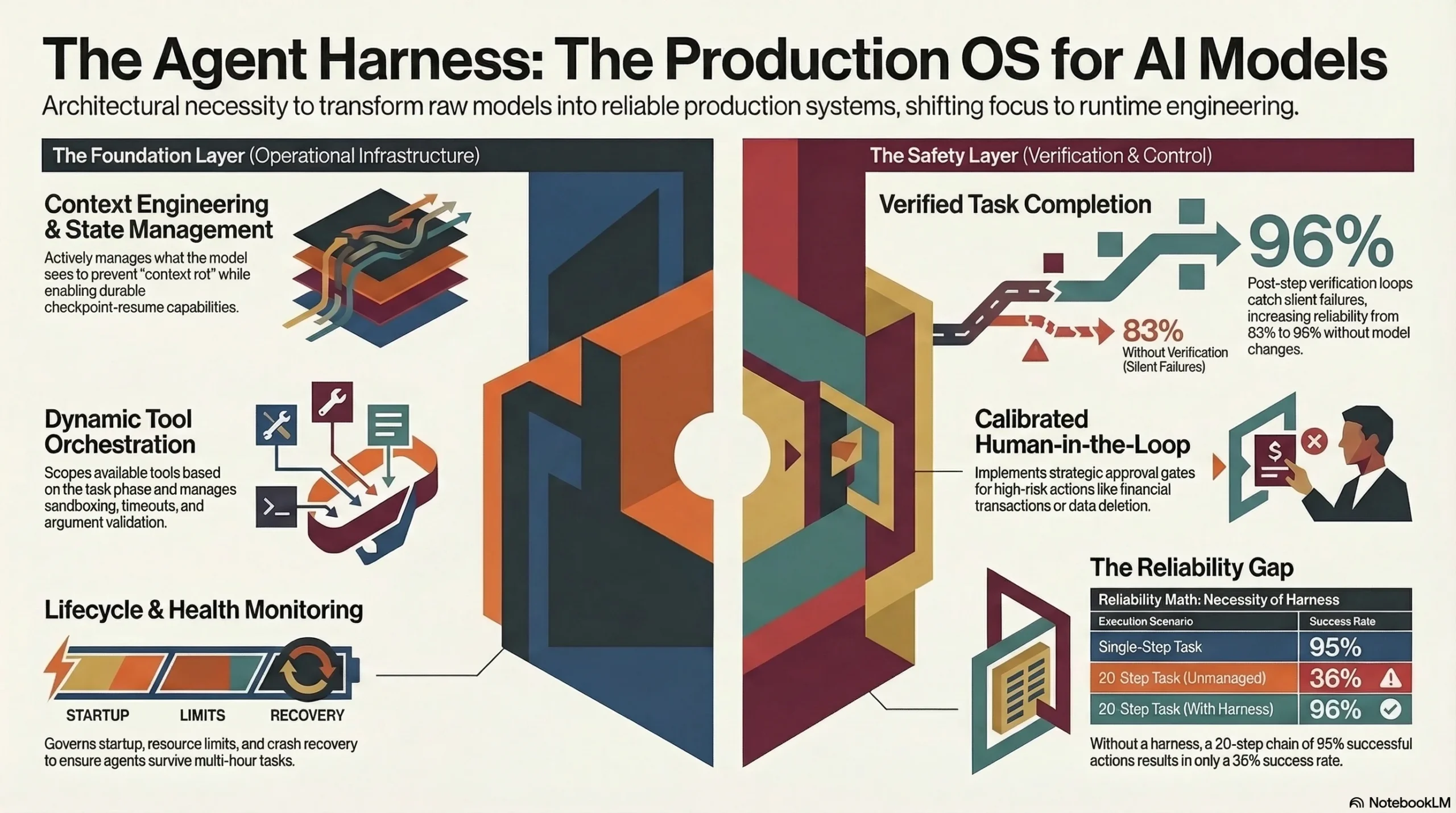
The reliability math makes this obvious. Assume each step in a multi-step agent pipeline succeeds 95% of the time. That sounds solid. But chain 20 steps together and your end-to-end task completion rate drops to 36%. This is why teams report agents that “work 95% of the time” but somehow fail on a third of real tasks. The harness is what adds verification loops, retry policies with backoff, and checkpoint-resume to push that compounding failure rate back toward acceptable levels.
The timeline data from teams building production harnesses tells the real story. Manus, the autonomous agent that went viral in early 2025, spent six months and five complete architectural rewrites on their harness before it was production-ready. LangChain’s team spent over a year iterating through four distinct architectures for LangGraph’s execution engine. These aren’t weekend projects. This is serious infrastructure work, on par with building a database or an operating system scheduler.
Then there’s Vercel’s paradox: when building their v0 coding agent, they removed 80% of the tools available to the model and got measurably better results. More tools meant more confusion, more incorrect tool selections, and more failed tasks. The harness, specifically the tool orchestration layer, had to constrain the model’s options to improve its output. Less capability, more reliability.
This is the core insight of harness engineering as a discipline. The competitive advantage in AI products has shifted from “which model are you using?” to “how good is your harness?” Two teams using the same model can see task completion rates of 60% vs. 98% based entirely on harness quality.
The six core components of an agent harness
Every production-grade agent harness shares six fundamental components. The maturity of each determines your agent’s reliability ceiling.
1. Context engineering
Context engineering is the practice of deciding what information the model sees at each step of execution. This is broader than prompt engineering, it encompasses the full input pipeline: system prompts, retrieved documents, conversation history, tool results, and environmental state.
The challenge is the context window. At 128K or 200K tokens, it seems enormous until your agent is 50 steps into a complex task and has accumulated tool outputs, error messages, and intermediate results that have pushed the useful context off the window. Context engineering means actively managing what stays, what gets summarized, and what gets dropped. OpenAI’s Codex harness, for example, uses machine-readable artifacts and architectural constraint files to keep the model focused across hundreds of steps.
2. Tool orchestration
Tool orchestration manages which tools are available to the model at each step and how their execution is handled. This includes tool selection, argument validation, execution sandboxing, timeout management, and error handling.
Naive tool integration, give the model a list of 50 tools and hope it picks the right one, fails reliably. Vercel learned this when they cut their tool set by 80%. Production harnesses dynamically scope available tools based on task phase. A planning step doesn’t need file system write access. A code execution step doesn’t need web search. Constraining the tool set per step reduces errors and token waste.
3. State and memory management
Agents that run for minutes or hours need durable state. If your harness crashes mid-task, can the agent resume from where it left off, or does it restart from scratch? Checkpoint-resume isn’t optional for production agents, it’s fundamental.
State management also covers memory across sessions. When an agent picks up a task the next day, what does it remember? How is that memory structured? Anthropic’s approach uses a claude-progress. txt file that the agent updates as a structured scratchpad alongside git history, giving the next session a compressed summary of prior work rather than replaying the full conversation.
4. Verification and safety
Verification loops check agent outputs before they reach the real world. This is the single highest-impact pattern in agent harness engineering. A verification step after each tool call, checking response schema, validating outputs against expectations, running tests before committing code, catches the silent failures that otherwise compound through multi-step execution.
The pattern is straightforward: agent produces output, verification layer evaluates it against defined criteria, passing outputs proceed, failing outputs trigger retry or escalation. We’ve seen teams go from 83% to 96% task completion rates by adding structured verification. The model didn’t change. The harness changed.
5. Human-in-the-loop controls
Not every agent action should be autonomous. Production harnesses need approval gates for high-risk operations: deleting data, sending external communications, making financial transactions, or modifying infrastructure. The harness defines which actions require human approval, how that approval is requested, and what happens while the agent waits.
The design challenge is calibration. Too many approval gates and the agent is slower than doing the task manually. Too few and you’re one hallucinated API call away from a production incident. The best harnesses start with aggressive approval requirements and relax them as the team builds confidence in specific action categories.
6. Lifecycle management
Lifecycle management covers agent startup, health monitoring, graceful shutdown, and crash recovery. Production agents aren’t request-response functions, they’re long-running processes that need the same operational care as any production service.
This means health checks (is the agent still making progress or stuck in a loop?), resource limits (maximum tokens per task, maximum wall-clock time), graceful shutdown (save state, release resources, report final status), and crash recovery (detect failure, load checkpoint, resume with backoff). Without lifecycle management, agents become expensive, unmonitored processes that fail silently.
Agent harness vs. agent framework: what’s the difference?
The terms get conflated, but they describe different things.
An agent framework is a library for building agents. LangChain, CrewAI, AutoGen, and Semantic Kernel are frameworks. They provide components, prompt templates, tool abstractions, memory interfaces, agent loops, that you compose into an agent architecture. The framework is the blueprint and the building materials.
An agent harness is the runtime environment that governs how an agent executes. The Claude Agent SDK, OpenAI’s Codex harness, and custom orchestration layers are harnesses. They manage context, enforce safety, handle failures, persist state, and control the agent’s lifecycle. The harness is the factory floor where the blueprint becomes a running production system.
| Dimension | Framework | Harness |
|---|---|---|
| Scope | Build-time components | Runtime execution environment |
| Purpose | Assemble agent architecture | Govern agent behavior in production |
| Examples | LangChain, CrewAI, AutoGen | Claude Agent SDK, Codex harness |
| Who uses it | Developers building agents | Infrastructure managing running agents |
| When it matters | Design and implementation | Deployment and operations |
You often use both. A framework to build the agent, a harness to run it. But many teams skip the harness, they deploy framework-built agents directly into production without the runtime infrastructure that makes them reliable. That’s where the failures start.
For detailed framework comparisons and evaluations, see our sister site agent-harness. ai, which covers the tools side of this equation.
How OpenAI built their Codex harness
OpenAI’s harness engineering post documents one of the most instructive examples in the field. Over five months, their team wrote zero lines of application code manually. Instead, they built the harness, the infrastructure layer, and let agents generate over 1 million lines of code through it.
The context engineering approach was the foundation. Rather than feeding raw codebases to the model, they created machine-readable artifacts: architectural constraint documents, API contracts, and design decision records that gave the model structured context about the system it was building. The model didn’t need to understand the full codebase. It needed to understand the architectural boundaries and the contracts between components.
Verification was equally critical. The harness ran pre-commit hooks, custom linters, and structural tests on every code generation output. Code that failed verification was rejected automatically, with the failure reason fed back to the model for a retry. This closed-loop verification is what made 1 million lines of agent-generated code viable, not the model’s intelligence, but the harness’s ability to catch and correct errors continuously.
The cultural shift was perhaps the most significant finding. Engineers stopped writing code and started designing harnesses. Their job became defining constraints, writing verification rules, building context pipelines, and tuning the infrastructure that governed the model’s output. The harness became the product. The model became an interchangeable component inside it.
Anthropic’s approach to long-running agent harnesses
Anthropic’s engineering team published a detailed guide on effective harnesses for long-running agents that addresses one of the hardest problems in AI agent infrastructure: context rot.
Context rot occurs when an agent running across multiple sessions gradually loses track of its original goal, accumulates irrelevant context, and starts making decisions based on stale or misleading information. It’s the agent equivalent of a developer who’s been context-switching across too many projects, still technically working, but no longer effective.
Anthropic’s architecture uses a two-agent pattern to combat this: an initializer agent that sets up the task context, and a coding agent that executes the work. The initializer runs fresh at the start of each session, analyzing the current state of the codebase and the task requirements to construct a clean context for the working agent. This mirrors how experienced teams handle shift changes, the incoming engineer doesn’t read every message from the last 8 hours. They get a structured handoff brief.
The progress file pattern is the key mechanism. The agent maintains a claude-progress. txt file, a structured scratchpad that records completed steps, current blockers, architectural decisions made, and next actions. This file, alongside git history, gives each new session a compressed, relevant summary rather than a raw replay of prior work. It’s checkpoint-resume for context, not compute.
The human engineering insight behind this work is worth noting: treat agent handoffs like shift changes at a hospital. Structured handoffs. Explicit status. Clear next steps. The patterns that make human teams reliable across shifts apply directly to agent sessions.
Building your first agent harness: a practical framework
Start simple. The most common mistake is over-engineering the harness before you understand your agent’s actual failure modes. Build the minimum viable harness, observe how your agent fails, and add infrastructure in response to real problems.
Phase 1: Add verification loops
Before your agent commits code, sends a message, or takes any irreversible action, add a verification step. This can be as straightforward as running tests after code generation, checking API response schemas after tool calls, or having a second model evaluate the primary model’s output. Verification loops deliver the highest reliability improvement per engineering hour of any harness component.
Phase 2: Add state persistence
Make your agent’s work durable. After each successful step, serialize the agent’s state to persistent storage, a database, a file system, a durable queue. When (not if) the agent crashes, restart from the last checkpoint instead of replaying the entire task. This cuts token costs during failures by 30-50% and eliminates the maddening experience of watching an agent redo two hours of work because of a transient network error.
Phase 3: Add observability
You need to know what your agent is doing. Instrument execution traces for every tool call, model invocation, and decision point. Track token usage, wall-clock time, and cost per task. Build dashboards that show task completion rates, failure modes, and cost trends. Without observability, you’re operating a non-deterministic system blind, and the failure modes will find you through customer complaints rather than monitoring alerts.
Phase 4: Add human-in-the-loop controls
Identify which agent actions carry real-world risk and add approval gates. Start conservative, require human approval for anything destructive, external, or expensive. As you build confidence in the agent’s behavior in specific categories, relax the gates. This gives you a production safety net while you learn your agent’s actual failure patterns.
A critical warning: building a production-ready harness takes months, not days. Martin Fowler’s team documented this reality, the harness engineering effort is often larger than the agent logic itself. Plan accordingly. Budget accordingly. Staff accordingly.
Common agent harness failure modes
Understanding how harnesses fail is as important as understanding how to build them. These are the patterns we see repeatedly across production deployments.
Context rot. Over long-running tasks, the agent’s context accumulates noise, irrelevant tool outputs, superseded decisions, resolved errors, until the model can no longer identify what’s current and important. Symptoms include the agent re-solving problems it already solved, contradicting its own earlier decisions, or losing track of the original task goal. The fix is active context management: summarization, pruning, and the progress file pattern Anthropic documented.
Tool explosion. Giving the model access to too many tools at once degrades performance. The model spends tokens reasoning about which tool to use, selects incorrect tools more frequently, and generates malformed tool calls. Vercel’s experience, removing 80% of tools improved results, is consistent across the industry. The fix is dynamic tool scoping: expose only the tools relevant to the current task phase.
Silent failures. The agent calls a tool, receives an error or empty response, and proceeds as if the call succeeded. Downstream steps operate on missing data, producing outputs that look plausible but are wrong. This is the most dangerous failure mode because it’s invisible without verification loops. The fix is structured output validation after every tool call.
Infinite loops. The agent hits an error, retries, hits the same error, retries again, indefinitely. Without retry limits, backoff policies, and loop detection, this pattern can burn through thousands of dollars in API calls overnight. The fix is enforcing maximum retry counts, exponential backoff, and heuristic loop detection that identifies when the agent is repeating the same action without progress.
State corruption. After a crash and recovery, the agent resumes from a checkpoint but the external world has changed. Files have been modified, API state has shifted, or another process has taken conflicting actions during the downtime. The agent’s checkpoint says “step 7 of 10 complete” but the preconditions for step 8 no longer hold. The fix is validation of preconditions on checkpoint resume, not blind replay.
Frequently asked questions
Is an agent harness the same as an agent framework?
No. A framework provides the building blocks for constructing an agent (prompt templates, tool abstractions, memory interfaces). A harness is the runtime infrastructure that governs how an agent executes in production, managing context, verifying outputs, persisting state, and handling failures. You build with a framework. You run inside a harness. Most teams need both.
Do I need a custom harness, or can I use an off-the-shelf one?
It depends on your agent’s complexity. Simple single-turn agents (answering questions, generating summaries) can often run with minimal harness infrastructure. Multi-step agents that call tools, make decisions, and run for extended periods need custom harness components tuned to your specific failure modes, verification requirements, and operational context. Start with an SDK (like the Claude Agent SDK) and add custom layers as your needs dictate.
How long does it take to build a production-ready harness?
Months, not weeks. Manus spent six months and five rewrites. LangChain iterated through four architectures over a year for LangGraph. Even smaller teams report 2-4 months to build harness infrastructure they trust in production. The timeline depends on your agent’s complexity, your reliability requirements, and your team’s prior experience with non-deterministic systems.
What’s the relationship between context engineering and harness engineering?
Context engineering is a component of harness engineering. It’s the practice of managing what information the model sees at each execution step, one of the six core components of an agent harness. Harness engineering is the broader discipline that encompasses context engineering along with tool orchestration, state management, verification, human-in-the-loop controls, and lifecycle management.
Conclusion
The competitive advantage in AI products has shifted. Model selection still matters, but the gap between available models is narrowing while the gap between harness quality across teams is widening. Two engineering teams using the same Claude or GPT model can see a 40-point difference in task completion rates based entirely on their agent harness design.
The core takeaway from this guide: invest in your harness, not in your model. Context engineering, verification loops, state management, tool orchestration, human-in-the-loop controls, and lifecycle management, these six components determine whether your agent is a compelling demo or a reliable production system.
The organizations leading in AI product quality in 2026 aren’t the ones with exclusive model access. They’re the ones with the most mature harness engineering practices, the teams that treat their harness as the product and the model as a replaceable component inside it.
If you’re building agent infrastructure and want production-tested patterns delivered weekly, subscribe to our newsletter for architecture deep dives, failure mode analyses, and harness engineering case studies from teams operating agents at scale. If your team is evaluating agent harness architecture and wants a structured review, reach out for an architecture consultation.
4 thoughts on “The Complete Guide to Agent Harness: What It Is and Why It Matters”