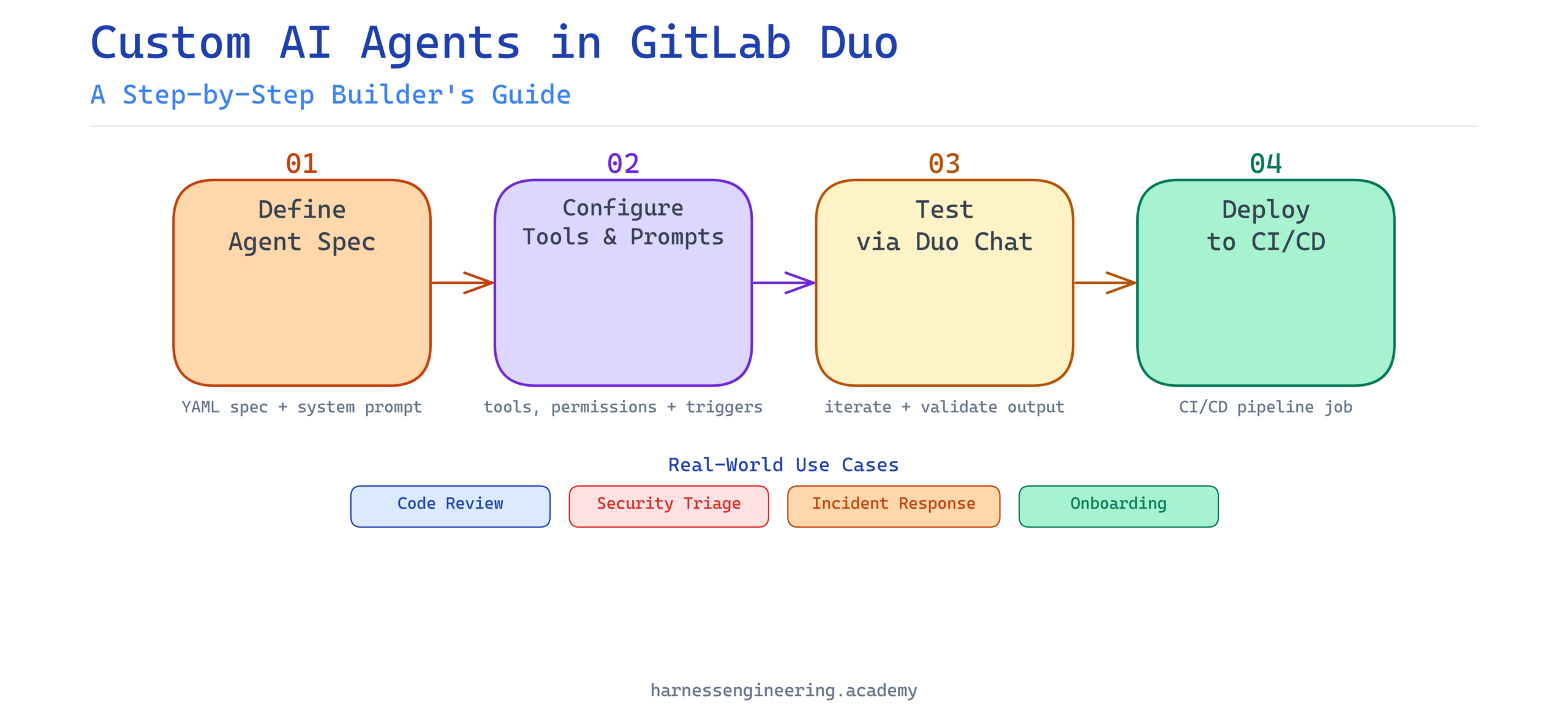
If you have been following the AI engineering space, you already know that AI agents are rapidly moving from experimental curiosity to production reality. And if you work with GitLab — or plan to — there is genuinely exciting news: GitLab Duo now supports custom AI agents that you can build, configure, and deploy directly inside your existing DevSecOps workflow.
This guide is for you whether you are just starting out in AI engineering or you are a seasoned developer who wants to understand what GitLab Duo’s agentic capabilities actually look like in practice. By the end of this tutorial, you will know what GitLab Duo is, what custom AI agents mean in this context, how to set one up step by step, and how this skill positions you in today’s job market.
Let’s get into it.
What Is GitLab Duo?
GitLab Duo is GitLab’s suite of AI-powered features built directly into the GitLab platform. Think of it as the AI layer on top of the version control, CI/CD, and security workflows that engineering teams already use every day.
Launched in stages starting in 2023 and continuously expanded since, GitLab Duo includes capabilities such as:
- Duo Chat — a conversational assistant embedded in the GitLab UI and IDE extensions
- Code Suggestions — real-time code completions as you type
- Vulnerability Explanation and Resolution — AI-generated explanations and fix suggestions for security findings
- CI/CD Component Generation — assistance writing pipeline configuration
- Root Cause Analysis — automated diagnosis of failed pipeline jobs
- Custom AI Agents (Duo Agent Toolkit) — the feature we will focus on today
GitLab Duo is model-agnostic in its architecture, meaning GitLab can route requests through different underlying language models (including their own hosted options and, in some configurations, models you supply). This is important when you are building custom agents, because it shapes how much control you have over model behavior.
Where Custom Agents Fit In
Out-of-the-box, GitLab Duo handles a broad set of generic tasks. But engineering teams have unique workflows, proprietary codebases, internal tools, and specific domain knowledge that generic AI assistants simply cannot understand without context. Custom AI agents are how you close that gap.
A custom GitLab Duo agent is a configured, scoped AI agent that you define with specific instructions, tools, and permissions. It can interact with GitLab resources (issues, merge requests, pipelines, repositories) and optionally connect to external systems via APIs or webhooks.
What Are Custom AI Agents?
Before diving into the GitLab-specific implementation, it helps to have a clear mental model of what a “custom AI agent” actually is.
An AI agent is software that perceives its environment, makes decisions, and takes actions toward a defined goal — often using a large language model (LLM) as its reasoning core. What makes an agent “custom” is that you have shaped:
- Its persona and instructions — what role it plays and how it behaves
- Its tools — what external actions it can take (call an API, read a file, open an issue)
- Its memory and context — what information it has access to and can retain
- Its scope of authority — what it is allowed to do autonomously vs. when it should defer to a human
In GitLab Duo’s context, a custom agent might be something like:
- A “Release Manager Agent” that monitors merge requests, checks compliance criteria, and automatically drafts release notes
- A “Security Triage Agent” that reads new vulnerability reports and assigns them to the right team with a pre-drafted remediation plan
- An “Onboarding Agent” that answers new engineer questions about your internal codebase and coding standards by referencing your actual documentation
These are not hypothetical. Teams are building exactly these kinds of agents today.
Prerequisites
Before you build your first custom GitLab Duo agent, make sure you have the following in place.
Technical Requirements
- A GitLab instance (SaaS on GitLab.com or self-managed) running GitLab 17.0 or later
- GitLab Duo Enterprise license (custom agents require the Enterprise tier as of early 2026)
- A GitLab group or project where you have at least Maintainer-level permissions
- Basic familiarity with YAML (for pipeline and configuration files)
- Basic familiarity with REST APIs (for tool integrations)
Conceptual Prerequisites
- Understanding of what LLMs are and how prompts work
- Familiarity with GitLab’s core concepts: repositories, issues, merge requests, pipelines
- A rough idea of the workflow problem you want the agent to solve
If you are new to AI agent concepts, the Harness Engineering Academy has a solid foundation course — explore our AI agent fundamentals track to get up to speed quickly before continuing.
Step-by-Step: Building a Custom AI Agent in GitLab Duo
We are going to build a practical example: a Code Review Quality Agent that reviews merge requests for code quality issues, checks for adherence to your team’s coding standards, and posts a structured review comment.
Step 1: Enable GitLab Duo Features in Your Group
First, make sure GitLab Duo is enabled for your group.
- Navigate to your GitLab group
- Go to Settings > GitLab Duo
- Toggle “GitLab Duo features” to On
- Ensure “Duo Chat” and “Duo Workflow” features are enabled
For self-managed instances, your administrator may need to enable Duo at the instance level first under Admin Area > Settings > GitLab Duo.
Step 2: Access the Duo Agent Configuration
GitLab provides agent configuration through a dedicated YAML-based spec file committed to your repository. As of GitLab 17.x, you create agents by defining them in a special file path the platform recognizes.
Navigate to your project repository and create the following file path:
.gitlab/duo-agents/code-review-quality-agent.yml
This naming convention is important. GitLab scans the .gitlab/duo-agents/ directory to discover and register agent definitions.
Step 3: Define the Agent Specification
Here is a working example of a Code Review Quality Agent configuration:
# .gitlab/duo-agents/code-review-quality-agent.yml

name: code-review-quality-agent
display_name: "Code Review Quality Agent"
description: >
  Reviews merge requests for code quality, adherence to team standards,
  and common anti-patterns. Posts a structured review comment.
version: "1.0.0"

# The system prompt defines the agent's persona and behavior
system_prompt: |
  You are a senior software engineer and code reviewer for this project.
  Your role is to review code changes in merge requests with a focus on:
  - Code readability and maintainability
  - Adherence to the project's coding standards (see CONTRIBUTING.md)
  - Potential performance issues
  - Security anti-patterns
  - Missing or insufficient test coverage

  Always be constructive, specific, and cite line numbers where applicable.
  Format your output as a structured Markdown review with sections:
  ## Summary, ## Issues Found, ## Suggestions, ## Verdict

# Tools the agent is permitted to use
tools:
  - name: read_merge_request
    description: "Read the diff and metadata of a merge request"
    gitlab_resource: merge_request
    permission: read

  - name: read_file
    description: "Read a specific file from the repository"
    gitlab_resource: repository_file
    permission: read

  - name: post_comment
    description: "Post a review comment on a merge request"
    gitlab_resource: merge_request_note
    permission: write

# Triggers define when the agent activates automatically
triggers:
  - event: merge_request.opened
    filter:
      target_branch: main
  - event: merge_request.updated
    filter:
      target_branch: main

# Safety and scope limits
limits:
  max_tokens_per_run: 8000
  max_tool_calls_per_run: 10
  human_approval_required: false
Let’s unpack the key sections:
- system_prompt: This is your agent’s “brain instructions.” The more specific and grounded this is, the better the agent performs. Reference actual files in your repo (like
CONTRIBUTING.md) to anchor it to your real context. - tools: These declare what the agent can interact with. Notice the explicit
permissionfield — GitLab enforces a strict read/write model to prevent agents from taking unintended destructive actions. - triggers: These define when the agent runs automatically. You can also invoke agents manually via Duo Chat.
- limits: Guardrails to prevent runaway token usage or excessive API calls.
Step 4: Commit and Register the Agent
Commit your agent definition file to the repository’s default branch:
git add .gitlab/duo-agents/code-review-quality-agent.yml
git commit -m "feat: add code review quality AI agent"
git push origin main
Once pushed, GitLab will automatically detect and register the agent. You can verify registration by navigating to:
Your Project > Settings > Duo Agents
You should see your code-review-quality-agent listed with its status shown as Active.
Step 5: Test the Agent Manually via Duo Chat
Before relying on automated triggers, test your agent manually. Open a merge request in the project, then open Duo Chat (the chat icon in the left sidebar or via the keyboard shortcut Ctrl+Shift+P).
In Duo Chat, type:
/agent code-review-quality-agent review this merge request
The agent will invoke its tools, read the MR diff, cross-reference your repo’s contributing guidelines, and produce a structured review comment. Review the output critically — this is your prompt engineering feedback loop.
Step 6: Iterate on the System Prompt
Your first run will likely surface areas where the agent’s output could be more precise. This is normal and expected. Treat prompt iteration as a core part of agent development, not an afterthought.
Some common improvements to make at this stage:
Add concrete examples to your system prompt:
system_prompt: |
  ...
  Example of a well-formed issue comment:
  > Line 42 in `auth/handler.go`: The token comparison uses `==` instead of
  > `crypto/subtle.ConstantTimeCompare`, creating a timing attack vulnerability.
  > Severity: High. Fix: Replace with subtle.ConstantTimeCompare(token, expected).
Add negative instructions to prevent unwanted behavior:
system_prompt: |
  ...
  Do NOT comment on formatting issues that can be handled by automated linters.
  Do NOT flag issues that are already captured in existing open issues for this MR.
  Do NOT approve or reject the MR — only provide the structured review.
Ground the agent in your actual standards:
Instead of generic instructions, have the agent read your real documentation:
tools:
  - name: read_contributing_guide
    description: "Read the project CONTRIBUTING.md for coding standards"
    gitlab_resource: repository_file
    path: "CONTRIBUTING.md"
    permission: read
Step 7: Configure CI/CD Integration (Optional but Powerful)
For teams that want even tighter integration, you can trigger the agent as part of a CI/CD pipeline stage. This is useful when you want the agent to run deterministically on every MR rather than relying on event-based triggers.
Add a job to your .gitlab-ci.yml:
ai-code-review:
  stage: review
  image: gitlab-duo-agent-runner:latest
  script:
    - duo-agent run code-review-quality-agent
      --context merge_request
      --mr-iid $CI_MERGE_REQUEST_IID
      --project $CI_PROJECT_ID
  rules:
    - if: $CI_PIPELINE_SOURCE == "merge_request_event"
This ensures the agent runs as part of the pipeline, and its output becomes visible in the pipeline logs alongside other quality checks.
Practical Use Cases for GitLab Duo Custom Agents
Once you understand the pattern, the possibilities scale quickly. Here are some high-impact use cases teams are deploying today:
Security Triage Agent
Reads new vulnerability findings from GitLab’s security dashboard, assesses severity, maps them to the responsible team based on code ownership, and creates pre-populated issues with remediation suggestions. This cuts triage time from hours to minutes.
Incident Response Agent
Monitors failed pipelines, reads logs, identifies the root cause commit, and posts a diagnostic summary to the associated issue — tagging the last author and suggesting rollback options. Engineers wake up to context, not chaos.
Documentation Drift Agent
Runs weekly against recently changed files, identifies functions and modules whose documentation comments are out of date relative to the implementation, and opens issues with suggested doc updates. Technical debt, managed proactively.
Onboarding Knowledge Agent
A read-only agent that new team members can query via Duo Chat to understand the codebase: “Where is authentication handled?” or “How does the payment retry logic work?” — answered with accurate, code-grounded explanations rather than outdated wiki pages.
Best Practices for GitLab Duo Agent Development
Building agents that are genuinely useful — rather than just technically functional — requires attention to a few key principles.
Keep System Prompts Specific and Bounded
Generic system prompts produce generic, often unhelpful output. The more precisely you define the agent’s scope, persona, and expected output format, the more reliable it becomes. Think of the system prompt as a job description: vague job descriptions attract mediocre performance.
Start with Read-Only Permissions
When prototyping, restrict your agent to read-only tool permissions. Only introduce write permissions (posting comments, creating issues, modifying files) once you have validated the agent’s judgment through manual review. This practice prevents embarrassing or damaging automated actions.
Log Every Agent Run
Use GitLab’s audit log integration to capture agent invocations, tool calls, and outputs. This gives you both a debugging trail and the evidence you need to demonstrate to stakeholders that the agent is behaving as intended.
Build in Human Review Gates for High-Stakes Actions
For any action that is difficult to reverse — merging code, closing issues, deploying to production — configure human_approval_required: true in your agent spec. The agent can prepare the action and present it, but a human clicks the final button.
Version Your Agent Definitions
Because agent specs are committed to your repository, you get version control for free. Tag releases of your agents alongside your application code, and use GitLab’s MR review process for changes to agent configuration — the same rigorous review you would apply to production code changes.
Career Relevance: Why GitLab Duo Agent Skills Matter Now
The market for engineers who can build, configure, and maintain AI agents inside real DevSecOps workflows is growing fast. And here is what makes GitLab Duo specifically valuable from a career perspective: it is not an isolated AI tool. It sits inside the workflow where software is actually built and shipped.
An engineer who can build a reliable code review agent that integrates with merge requests, pipelines, and security scanning is solving a real, measurable problem for real engineering teams. That is a different — and more hireable — skill than someone who can build a chatbot in isolation.
The skills you practice here transfer directly to other agentic frameworks and platforms. Understanding how to write effective system prompts, define tool schemas, manage agent permissions, and iterate based on output quality are platform-agnostic competencies that will serve you across the full spectrum of AI agent engineering work.
If you want to accelerate your path toward becoming a professional AI agent engineer, Harness Engineering Academy’s structured learning paths take you from foundational concepts through to production-ready agent deployment — with hands-on projects at every stage.
Troubleshooting Common Issues
Agent Not Appearing in Project Settings
Check that your YAML file is committed to the default branch, not a feature branch. GitLab only scans the default branch for agent definitions during registration.
Agent Produces Inconsistent Output
This is almost always a system prompt issue. Add more specific output format requirements, include examples of ideal responses, and tighten the scope of instructions. If you are seeing hallucinations about code content, ensure your read_file tools are correctly configured and the agent is being given the actual code context.
Tool Permission Errors in Logs
Review the permissions declared in your agent spec versus the access level of the account or token used for agent execution. Duo agents execute with the permissions of the user or service account that triggers them, intersected with the permissions declared in the spec.
Trigger Not Firing Automatically
Verify that event triggers are supported in your GitLab version and that your Duo Enterprise license covers automated agent triggers. In some configurations, automated triggers must be explicitly enabled by a group owner.
What’s Next: Expanding Your Agent’s Capabilities
Once your foundational agent is running reliably, there are natural directions to grow:
- Add external tool integrations via webhooks to connect your agent to Jira, Slack, PagerDuty, or internal APIs
- Build a multi-agent workflow where one agent orchestrates others for complex, multi-step tasks
- Fine-tune context injection by providing the agent with richer project-specific context at invocation time
- Experiment with different underlying models if your GitLab configuration supports model selection, to find the best fit for your specific use case
The field of AI agent engineering is moving quickly, and GitLab Duo is one of the most pragmatic entry points available today — because it meets you where your work already happens.
Conclusion
Building custom AI agents in GitLab Duo is genuinely accessible to engineers at all levels — and the payoff in workflow automation and team leverage is real. The core pattern is consistent: define the agent’s role clearly, grant it the tools it needs, test and iterate on its behavior, and add safeguards proportional to the stakes of its actions.
What you have built in this tutorial — a Code Review Quality Agent — is a working foundation you can extend in any direction your team needs. From security triage to onboarding assistance to documentation maintenance, the same principles apply.
The engineers who will be most valuable in the next wave of software development are not those who simply use AI tools — they are those who know how to build, configure, and govern them. That is exactly the skillset this guide helps you develop.
Ready to go deeper? Explore Harness Engineering Academy’s full curriculum on AI agent development — including hands-on labs, career coaching, and a community of engineers building the future of agentic software development. Your next step is one click away.
Written by Jamie Park, Educator and Career Coach at Harness Engineering Academy. Jamie specializes in beginner-to-advanced AI engineering tutorials with a focus on practical, production-relevant skills.