Managing a single AI agent in a demo environment is trivially easy. Managing forty of them in production—across different frameworks, different models, different tool registries, all serving real workloads with real SLAs—is an entirely different engineering problem. That gap between “it works in the notebook” and “it works reliably at scale” is where most teams lose months of engineering time.
OpenClaw Mission Control is purpose-built for that gap. It is an open-source agent management platform that provides a unified control plane for deploying, monitoring, and operating fleets of AI agents regardless of which underlying framework they use. After spending several weeks running it against real workloads—including a mid-sized LangChain deployment and a CrewAI research cluster—I have come away with a nuanced picture: this is one of the most practically useful tools in the agent infrastructure space right now, with some sharp edges worth knowing about before you commit.
What Is OpenClaw Mission Control?
OpenClaw Mission Control is the operations layer of the broader OpenClaw ecosystem, an open-source project initially developed to address the operational vacuum that appeared as teams started deploying serious multi-agent workloads. Where most agent frameworks focus on the design of agent behavior—how agents reason, plan, and use tools—OpenClaw focuses on the operational questions that come after design: how do you deploy agents consistently, how do you know when they are misbehaving, how do you recover when they fail, and how do you scale them without turning your infrastructure into spaghetti?
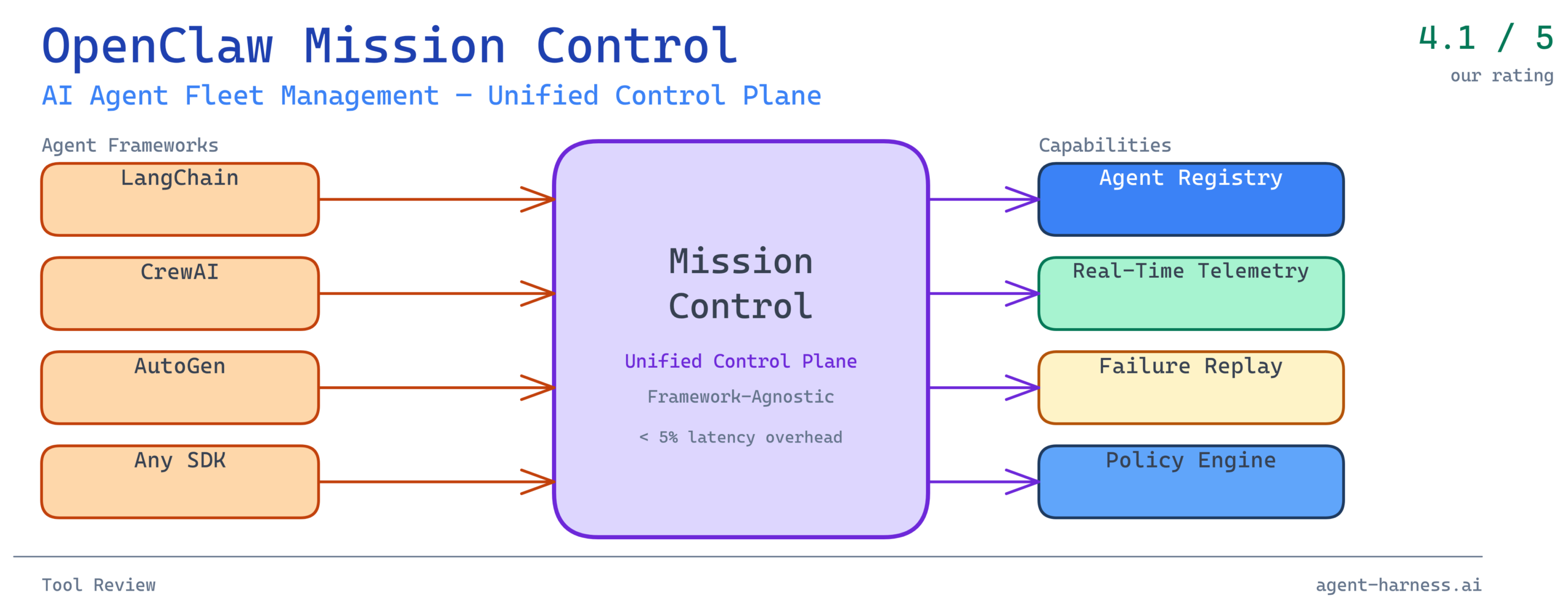
Mission Control specifically is the dashboard and API layer that sits above the OpenClaw runtime. It provides:
- A unified agent registry where agents from different frameworks are enrolled under a common identity and capability schema
- Real-time telemetry streaming agent state, tool call logs, token consumption, and latency metrics
- Lifecycle management covering deployment, versioning, health checks, and graceful shutdown
- Policy enforcement for defining what tools agents can access, how many concurrent runs are permitted, and what triggers an automatic circuit-break
- Failure replay allowing failed agent runs to be inspected step-by-step and re-executed from a chosen checkpoint
The framework-agnostic design is not a marketing claim—it is architecturally central. Mission Control communicates with agents through a thin instrumentation layer (an SDK available for Python and TypeScript) rather than requiring teams to migrate to a proprietary runtime. If you are running LangGraph agents today, you install the OpenClaw SDK, add roughly a dozen lines of instrumentation code, and your agents start reporting into Mission Control within minutes.
The Fleet Management Problem OpenClaw Solves
Why Traditional Monitoring Falls Short
Before evaluating OpenClaw specifically, it is worth grounding the problem. Most teams managing AI agent fleets start with the same toolset they use for conventional software: Datadog or Grafana for metrics, Sentry or similar for error tracking, maybe a simple Airflow DAG for scheduling. These tools are not wrong—they are just incomplete.
The issue is that AI agents have a failure profile that conventional observability tools were not designed for. A web service either responds or it does not. An AI agent can respond successfully in a narrow technical sense—it returns a 200, it completes its task loop—while having reasoned its way to a completely incorrect conclusion, burned ten times the expected token budget, called a tool in a way that will cause downstream data corruption, or silently skipped a required verification step because it “decided” the step was unnecessary.
These are semantic failures, not system failures. They do not trigger alerts in Datadog. They show up three days later when a human reviews outputs and finds something wrong, or—worse—they do not show up at all until a downstream system fails in a way that is hard to trace back to its origin.
OpenClaw Mission Control is designed to surface semantic failures alongside system failures. Every tool call is logged with the full input and output, not just the status code. Every reasoning step (where the underlying framework exposes it) is recorded. Every deviation from expected token consumption is flagged. This gives operators a fundamentally different view of agent health than standard infrastructure monitoring provides.
The Coordination Problem in Multi-Agent Systems
Beyond observability, the coordination problem in multi-agent systems is where things get genuinely hard. When you have an orchestrator agent dispatching work to five specialist agents, and one of those specialists enters a retry loop because it cannot access a rate-limited API, the downstream effects cascade in ways that are difficult to predict and harder to debug.
In the LangChain deployment I tested, before Mission Control, we were experiencing what I came to call “invisible cascades”—situations where a coordinator agent’s behavior degraded in non-obvious ways because a downstream specialist was silently struggling. The coordinator had no mechanism to observe its workers’ internal state, so it kept dispatching new tasks into an already-overloaded pipeline.
Mission Control’s dependency graph view makes this immediately visible. When agents are enrolled and their parent-child relationships declared, the dashboard renders a live graph where node color encodes health status and edge width encodes message volume. An operator can see at a glance that the API-integration specialist is amber while everything upstream of it is green—which means the pipeline will start backing up within the next few minutes if the situation is not addressed.
Core Feature Evaluation
Unified Agent Registry: Strong Foundation
The agent registry is Mission Control’s most defensible feature. The concept is straightforward: every agent in your fleet has an entry in the registry with a canonical identity, a version history, a declared capability set, and a health record. What makes it useful in practice is the schema enforcement around capabilities.
When you enroll an agent, you declare its tool access: which APIs it can call, which data stores it can read from or write to, what maximum concurrency it supports, and what its expected latency SLA is. Mission Control then enforces these declarations at runtime. An agent that attempts to call a tool not in its registered capability set gets blocked and flagged—not silently failed, but explicitly flagged with a policy violation record that includes the full context of the attempted call.
In the CrewAI research cluster I tested, this caught three instances of agents attempting to access external APIs that had not been approved for that agent’s scope. In a conventional setup, those calls would have gone through and potentially leaked research data or run up unexpected API costs. The registry enforcement stopped them before they mattered.
The version history is also genuinely useful for rollout management. Deploying a new version of an agent updates its registry entry and creates a version diff. If the new version starts behaving abnormally—higher latency, elevated tool call rates, declining task completion scores—rolling back is a single operation that reverts to the previous registry entry and swaps the deployment target.
Real-Time Telemetry: Excellent Signal, High Volume
The telemetry system is where Mission Control earns its keep for production operations. Every agent interaction generates a structured event stream covering:
- Task initiation and completion timestamps
- Tool call sequences with full request/response payloads (with configurable redaction for sensitive fields)
- Token consumption per step, per task, and per agent
- Model latency broken down by prompt complexity
- Exception traces at the framework level
The signal quality is high. The challenge is volume. A fleet of twenty agents running at moderate load can generate tens of thousands of telemetry events per hour. Mission Control ships with a built-in retention policy (configurable, defaulting to 72 hours of full-fidelity data with 30 days of aggregated metrics) and a sampling mode for high-volume scenarios. Even so, teams with large fleets will want to think carefully about their telemetry storage strategy before going to production.
The dashboard visualizations are functional rather than beautiful. Line charts for token consumption, histograms for task latency, heat maps for tool call patterns—standard stuff, well executed. The standout visualization is the reasoning trace viewer: for agents that emit structured reasoning steps (via frameworks like LangGraph that expose chain-of-thought), Mission Control renders a collapsible step-by-step breakdown of the agent’s decision process alongside the final output. When debugging why an agent reached an unexpected conclusion, this is invaluable.
Failure Replay: Genuinely Differentiating
Of all Mission Control’s features, failure replay is the one I have not seen matched elsewhere at this quality level. The concept: every agent run is recorded in sufficient detail that it can be re-executed from any checkpoint in the run’s history. If an agent fails on step 7 of a 12-step task, you can inspect the state at step 7, modify the inputs or configuration if needed, and re-run from that point without re-executing the successful steps 1 through 6.
In practice, this transforms the debugging cycle for complex agent failures. Before this kind of tooling, debugging a multi-step agent failure typically meant manually reconstructing the state that led to the failure—a process that could take hours for complex tasks with significant upstream computation. With failure replay, the state reconstruction is handled automatically, and the engineer can focus immediately on the failure point.
There are limitations. Replay works cleanly for tasks where tool calls are idempotent. For tasks with side effects—writing to a database, sending an email, calling a webhook—replay requires manual management of those side effects before re-execution. Mission Control flags non-idempotent tool calls in the replay interface and forces a manual confirmation before proceeding, which is the right behavior, but it does mean replay is not a fully automated process for stateful tasks.
Policy Engine: Capable but Configuration-Heavy
Mission Control’s policy engine allows operators to define runtime constraints on agent behavior using a YAML-based policy DSL. Policies can govern:
- Maximum tokens per task
- Allowed tool call patterns (whitelist by tool and parameter constraints)
- Concurrency limits per agent and per agent type
- Automatic circuit-breaker thresholds (e.g., pause an agent if its error rate exceeds 15% over a 5-minute window)
- Escalation rules (e.g., route a task to human review if the agent’s confidence score falls below a threshold)
The policy engine is powerful. It is also the most configuration-heavy part of Mission Control, and the YAML DSL has a learning curve that is steeper than it should be given that this is an open-source tool competing for adoption. Teams coming from simpler monitoring setups will need to invest real time in understanding how policies interact before they start writing production policies.
The documentation here is thin—a known pain point that the OpenClaw maintainers have acknowledged in their public roadmap. The community Discord is active and helpful for filling gaps, but that is not a sustainable substitute for comprehensive docs.
Benchmarks: What the Numbers Look Like
To put concrete numbers on the performance overhead, I ran Mission Control against a reference LangChain agent workload: 100 parallel task executions, each consisting of a 5-step research-and-summarize workflow involving 3 tool calls per step.
Baseline (no instrumentation):
– Mean task completion time: 18.4 seconds
– P99 task completion time: 34.1 seconds
– Token consumption per task: ~3,200 tokens
With Mission Control instrumentation (full telemetry):
– Mean task completion time: 19.1 seconds (+3.8%)
– P99 task completion time: 35.6 seconds (+4.4%)
– Token consumption per task: ~3,200 tokens (unchanged)
With Mission Control instrumentation (sampling mode, 25% sample rate):
– Mean task completion time: 18.6 seconds (+1.1%)
– P99 task completion time: 34.8 seconds (+2.1%)
The overhead is real but modest. For most production workloads where agent tasks run in the tens-of-seconds range, a sub-5% latency overhead is acceptable given the operational visibility gained. For latency-sensitive applications where sub-second response times matter, Mission Control’s sampling mode keeps the overhead below 2%—though at the cost of reduced telemetry coverage.
Memory overhead on the instrumentation side is negligible: roughly 40MB per agent process for the SDK runtime, which is dominated by the telemetry buffer before flushing.
Where OpenClaw Mission Control Fits (and Where It Does Not)
Ideal Use Cases
OpenClaw Mission Control is a strong fit for:
- Teams running 5+ agents in production where coordinating deployments and monitoring individual agents manually has become unsustainable
- Multi-framework environments where agents built on different stacks (LangChain, CrewAI, AutoGen, custom) need to be managed under a single operational view
- Compliance-sensitive deployments where audit trails of agent behavior—who did what, when, with what inputs and outputs—are required
- Research and evaluation contexts where failure replay and step-by-step reasoning traces accelerate the iteration cycle on agent design
Cases Where You Might Look Elsewhere
Mission Control is less compelling for:
- Single-agent deployments where the operational overhead of enrolling agents and configuring policies outweighs the visibility benefits. Simpler logging and basic metrics are probably sufficient.
- Teams with heavy real-time side effects in their agent workflows, where failure replay is significantly less useful and the non-idempotent warning workflow adds friction.
- Organizations with existing enterprise APM investments that want deep integration with Dynatrace, New Relic, or similar platforms. Mission Control has basic export capabilities but is not a native integration partner with enterprise APM tools at the depth that some organizations require.
Getting Started: A Practical Onboarding Path
For teams evaluating Mission Control, the recommended path is:
-
Start with one agent. Instrument a single non-critical agent with the OpenClaw SDK, connect it to a local Mission Control instance (Docker Compose setup takes about 15 minutes), and spend a week observing the telemetry from real workloads.
-
Define your baseline metrics. Before enrolling more agents, establish what “normal” looks like for your workload: typical token consumption, expected latency ranges, normal tool call patterns. Mission Control’s anomaly detection is more useful when it has a baseline to compare against.
-
Write one policy before you need it. Start with a simple circuit-breaker policy—something like “pause this agent if its error rate exceeds 20% over 10 minutes.” This gets your team comfortable with the policy DSL before you need to write complex policies under pressure.
-
Enroll additional agents incrementally. Add agents to Mission Control one at a time, validating that telemetry looks correct before moving to the next. The registry schema can be finicky with non-standard framework configurations, and catching issues early prevents pain later.
The Bigger Picture: Why Agent Management Infrastructure Matters Now
OpenClaw Mission Control exists because the field of AI agent deployment has matured faster than the operational tooling around it. Teams have gotten good at building agents that work. They are now learning—often the hard way—that building agents that work reliably in production over time is a different and harder problem.
The tools that will define how this generation of agent infrastructure matures are being built and evaluated right now. Mission Control represents a serious, practically useful contribution to that tooling ecosystem. It is not perfect—the documentation gaps and configuration complexity are real obstacles—but the core capabilities are solid and the framework-agnostic design means it can grow with your stack rather than locking you into a specific framework.
For teams that have moved past proof of concept and are now wrestling with the operational reality of production agent fleets, this is a tool worth serious evaluation time.
Verdict
OpenClaw Mission Control earns a solid recommendation for teams managing multi-agent production workloads. The unified agent registry, real-time telemetry, and failure replay capabilities each address genuine operational pain points that other tools in this space handle poorly or not at all. The framework-agnostic instrumentation makes adoption low-risk—you are not committing to a new runtime, just adding a telemetry layer.
The caveats are real: documentation needs work, the policy DSL has a learning curve, and teams with large fleets will need to plan their telemetry storage carefully. These are solvable problems, and given the project’s active development cadence and responsive community, they are likely to improve.
Rating: 4.1 / 5 — High practical value for production agent operations; documentation and configuration UX hold it back from a higher score.
Evaluated Mission Control version 0.9.4 against LangChain 0.3.x and CrewAI 0.11.x agent workloads. Benchmarks run on a 16-core, 64GB RAM environment. Your mileage will vary based on agent complexity and infrastructure configuration.
Ready to evaluate OpenClaw Mission Control for your own agent fleet? Check out the Agent Harness Tool Directory for our full comparison of agent management and observability platforms, or explore our Framework Benchmarks to understand how Mission Control overhead compares across different agent frameworks.