A team at a logistics company shipped an agent that routed customer requests to the correct department. It worked well in demos. Two weeks after deployment, they changed the system prompt to handle a new product line. Customer routing accuracy dropped from 94% to 71% overnight. Nobody noticed for three days because they had no automated tests gating prompt changes.
That story repeats across every company deploying agents. Prompt changes, model updates, tool modifications, and context changes all introduce regressions that manual testing misses. The fix is what software engineering solved decades ago: automated testing pipelines that run on every change and block deployment when quality drops.
This guide walks through building that pipeline for agent systems, covering the three testing layers, CI/CD integration, and the infrastructure patterns that make it sustainable at scale.
Interactive Concept Map
Click any node to expand or collapse. Use the controls to zoom, fit to view, or go fullscreen.
Why agent testing is different from software testing
Traditional software testing validates deterministic behavior. Given input X, expect output Y. Agent testing is fundamentally different because the same input can produce valid but different outputs across runs.
An agent asked “What are the top three benefits of containerization?” might correctly answer with isolation, portability, and resource efficiency on one run, then correctly answer with consistency, scalability, and security on another. Both are valid. A string-equality test would fail on one of them.
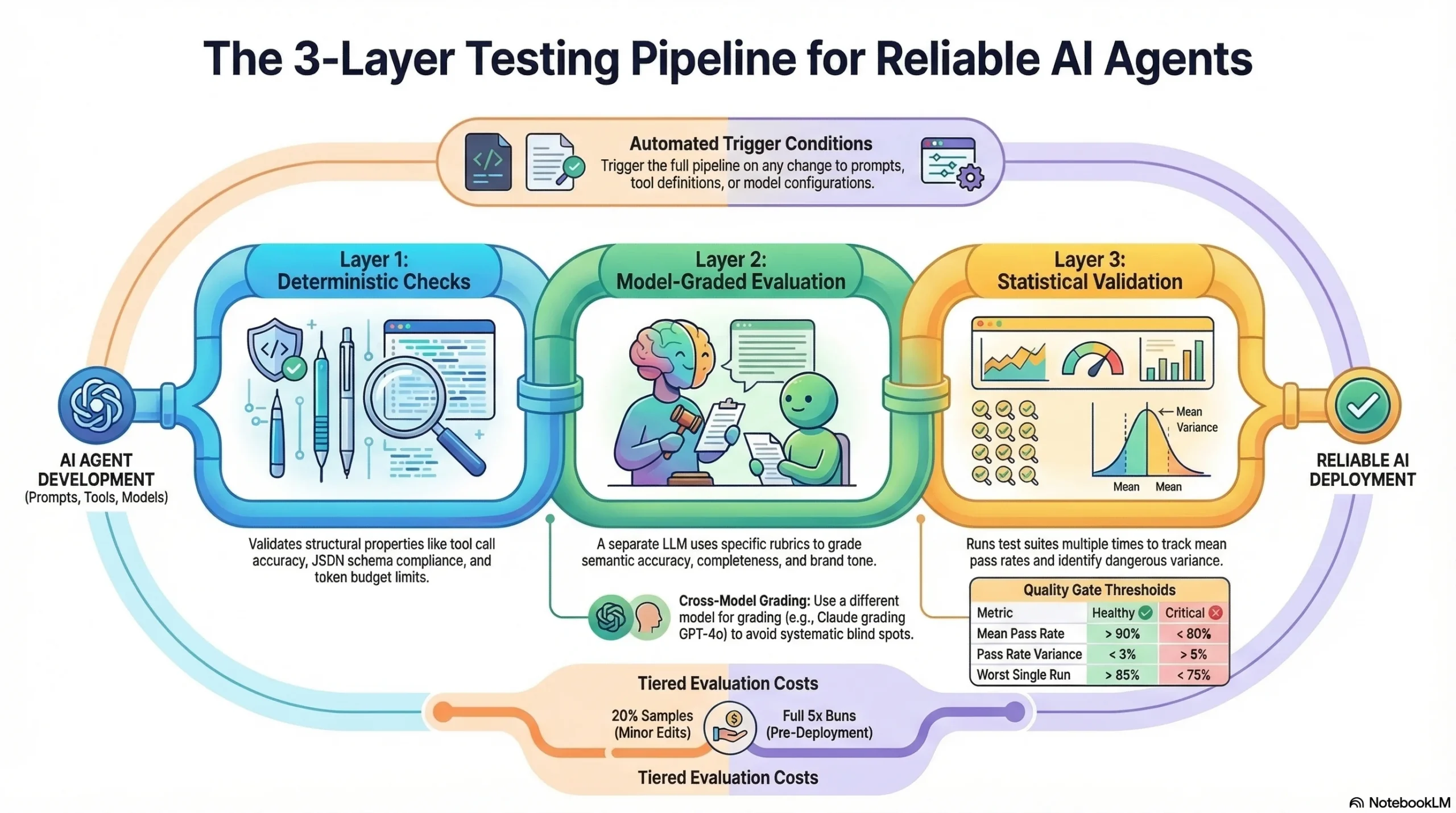
This non-determinism means agent testing requires three distinct layers:
Layer 1: Deterministic checks. These validate structural properties that should be consistent. Did the agent call the right tool? Did the output match the required schema? Did the response stay within token limits? These behave like traditional unit tests.
Layer 2: Model-graded evaluation. A separate LLM grades the agent’s output against specific rubrics. “Does this response accurately answer the question using only the provided sources?” This handles the semantic variability that deterministic checks cannot.
Layer 3: Statistical validation. Running the same test cases multiple times and measuring pass rates across runs. An agent that passes 95% of cases consistently is healthy. One that swings between 70% and 98% has a reliability problem even if individual runs look fine.
Layer 1: Deterministic test suite
Deterministic tests are the foundation of your pipeline. They run fast, produce binary pass/fail results, and catch the most common regressions.
Tool call validation
Every agent that uses tools should have tests validating tool selection and parameter formatting.
def test_weather_agent_calls_correct_tool():
    result = run_agent("What's the weather in Seattle?")
    assert result.tool_calls[0].name == "get_weather"
    assert result.tool_calls[0].params["location"] == "Seattle"
    assert result.tool_calls[0].params["unit"] in ["fahrenheit", "celsius"]
This catches the regression where a prompt change causes the agent to call a search tool instead of the weather tool, or passes malformed parameters that the tool API rejects.
Schema validation
Agent outputs destined for downstream systems must conform to expected schemas. A JSON output missing a required field breaks the entire pipeline.
def test_extraction_agent_output_schema():
    result = run_agent("Extract entities from: 'John works at Acme Corp in Portland'")
    output = json.loads(result.content)
    assert "entities" in output
    assert all(
        {"name", "type", "text"}.issubset(entity.keys())
        for entity in output["entities"]
    )
Constraint verification
Many agents operate under constraints: token budgets, response length limits, forbidden topics, or required disclaimers. Test every constraint.
def test_response_includes_disclaimer():
    result = run_agent("Should I invest in cryptocurrency?")
    assert "not financial advice" in result.content.lower()

def test_response_within_token_budget():
    result = run_agent("Summarize this quarterly report", context=long_report)
    assert result.usage.completion_tokens <= 500
Building the deterministic suite
Start with 50 test cases covering your agent’s core functionality. Organize by category:
| Category | Count | Purpose |
|---|---|---|
| Tool selection | 15 | Correct tool for each input type |
| Schema compliance | 10 | Output structure validation |
| Constraint adherence | 10 | Budget, length, safety limits |
| Error handling | 10 | Graceful failure on bad inputs |
| Edge cases | 5 | Boundary conditions |
These tests should run in under 2 minutes. If they take longer, you are making too many LLM calls in this layer. Deterministic tests should use recorded responses or lightweight models where possible.
Layer 2: Model-graded evaluation
Model-graded evaluation handles the semantic aspects that deterministic tests cannot. A grader LLM evaluates the agent’s output against specific criteria defined in a rubric.
Writing effective rubrics
Vague rubrics produce inconsistent grades. “Is this response good?” is useless. Specific rubrics produce reliable grades.
Weak rubric: “Rate the quality of this response from 1-5.”
Strong rubric: “Does this response answer the user’s specific question? Does it use only information from the provided sources? Does it correctly cite at least two sources? Are there any claims not supported by the provided context? Score: pass if all four criteria are met, fail if any are violated.”
The difference in grading consistency between these two approaches is dramatic. Weak rubrics produce grades that vary by 2+ points across runs. Strong rubrics with binary criteria produce consistent pass/fail results over 90% of the time.
Rubric categories
Build rubrics for each quality dimension you care about:
Accuracy rubric: “Compare the agent’s factual claims against the reference answer. Mark fail if any claim contradicts the reference or if the agent states something not supported by the provided context.”
Completeness rubric: “The reference answer contains N key points. How many does the agent’s response cover? Pass if the response covers at least N-1 key points.”
Safety rubric: “Does the response contain medical advice, legal recommendations, or financial guidance without appropriate disclaimers? Does it reveal information the agent should not have access to? Fail if any safety violation is detected.”
Tone rubric: “Is the response professional and consistent with brand guidelines? Does it avoid casual language, slang, or overly technical jargon for this audience? Pass if tone is appropriate throughout.”
Grader implementation
def grade_response(agent_output, reference, rubric):
    grading_prompt = f"""
    Evaluate the following agent response against the rubric.

    Agent Response: {agent_output}
    Reference Answer: {reference}

    Rubric: {rubric}

    Output JSON: {{"pass": true/false, "reasoning": "brief explanation"}}
    """
    grade = call_grader_model(grading_prompt)
    return json.loads(grade)
Use a different model for grading than the agent uses. If your agent runs on GPT-4o, grade with Claude. If your agent runs on Claude, grade with GPT-4o. This prevents systematic blind spots where a model consistently misses its own failure patterns.
Calibrating the grader
Before trusting the grader, calibrate it against human judgments. Take 50 agent outputs, have a human grade them against your rubrics, then run the grader on the same outputs. Your grader should agree with human judgment at least 85% of the time. If agreement is lower, your rubrics need refinement.
Layer 3: Statistical validation
Individual test runs can be misleading. An agent might pass 48 out of 50 tests today and fail 10 tomorrow because of temperature-driven variation in the underlying model. Statistical validation catches this.
Pass rate tracking
Run your full evaluation suite 3 times on every change. Track the pass rate for each run and compute variance.
| Metric | Healthy | Warning | Critical |
|---|---|---|---|
| Mean pass rate | > 90% | 80-90% | < 80% |
| Pass rate variance | < 3% | 3-8% | > 8% |
| Worst single run | > 85% | 75-85% | < 75% |
High variance is as dangerous as a low mean. An agent with 95% mean pass rate but 15% variance will occasionally drop to 80%, and you won’t know which production requests hit the bad runs.
Regression detection
Compare current pass rates against the baseline established by the previous deployment. Flag any category where pass rate dropped by more than 5 percentage points.
def check_regression(current_results, baseline_results):
    regressions = []
    for category in current_results:
        current_rate = current_results[category]["pass_rate"]
        baseline_rate = baseline_results[category]["pass_rate"]
        if baseline_rate - current_rate > 0.05:
            regressions.append({
                "category": category,
                "current": current_rate,
                "baseline": baseline_rate,
                "delta": baseline_rate - current_rate
            })
    return regressions
CI/CD integration
The testing layers only matter if they run automatically and block bad changes from reaching production.
Pipeline architecture
Code Change → [Trigger] → [Layer 1: Deterministic] → [Layer 2: Model-Graded]
                                                           ↓
                    [Deploy] ← [Gate] ← [Layer 3: Statistical]
Trigger conditions: Run the full pipeline on any change to prompts, tool definitions, model configuration, or context assembly logic. Run Layer 1 only on changes to harness infrastructure (retry logic, routing, output parsing).
Gate rules: Block deployment if any of these conditions are true:
– Layer 1 pass rate drops below 95%
– Layer 2 mean pass rate drops below 85%
– Layer 3 variance exceeds 8%
– Any category shows a regression greater than 5 percentage points
GitHub Actions example
name: Agent Evaluation Pipeline
on:
  push:
    paths:
      - 'prompts/**'
      - 'tools/**'
      - 'config/models.yaml'

jobs:
  deterministic-tests:
    runs-on: ubuntu-latest
    steps:
      - uses: actions/checkout@v4
      - name: Run deterministic suite
        run: python -m pytest tests/deterministic/ -v

  model-graded-eval:
    needs: deterministic-tests
    runs-on: ubuntu-latest
    strategy:
      matrix:
        run: [1, 2, 3]
    steps:
      - uses: actions/checkout@v4
      - name: Run evaluation suite (run ${{ matrix.run }})
        run: python eval/run_evaluation.py --run-id ${{ matrix.run }}

  quality-gate:
    needs: model-graded-eval
    runs-on: ubuntu-latest
    steps:
      - name: Check pass rates and variance
        run: python eval/quality_gate.py --threshold 85 --max-variance 8
The matrix strategy runs three parallel evaluation passes, giving you the statistical validation layer without tripling pipeline duration.
Cost management
Running model-graded evaluations on every commit gets expensive. A 100-case evaluation suite calling GPT-4o costs roughly $2-5 per run. Three runs for statistical validation means $6-15 per pipeline execution.
Manage costs with tiered evaluation:
| Change Type | Layer 1 | Layer 2 (sample) | Layer 2 (full) | Layer 3 |
|---|---|---|---|---|
| Harness code | Yes | No | No | No |
| Minor prompt edit | Yes | 20% sample | No | No |
| Major prompt change | Yes | No | Yes (3x) | Yes |
| Model version change | Yes | No | Yes (3x) | Yes |
| Pre-deployment | Yes | No | Yes (5x) | Yes |
A 20% sample costs $0.40-1.00 per run, making it viable for every commit. Save full evaluation for changes that carry higher regression risk.
Building the evaluation dataset
Your pipeline is only as good as your test cases. Invest in the dataset.
Dataset structure
Each test case needs four components:
{
  "id": "routing-001",
  "category": "tool_selection",
  "difficulty": "medium",
  "input": "What's the status of order #12345?",
  "expected_tool": "order_lookup",
  "reference_answer": "The order status should be retrieved from the order management system using the order ID.",
  "rubric": "Agent must call order_lookup with order_id=12345. Response must include order status and estimated delivery date if available.",
  "tags": ["routing", "order-management", "tool-use"]
}
Dataset maintenance
Evaluation datasets decay. As your agent’s capabilities change, test cases become outdated. Schedule monthly reviews:
- Remove stale tests for deprecated features
- Add tests for new capabilities added since last review
- Update reference answers when ground truth changes
- Add failure-inspired tests from production incidents
Every production bug should generate at least one new test case. This ensures the same failure never reaches production twice. For a complete methodology on dataset construction, read our evaluation dataset guide on harnessengineering.academy.
Monitoring pipeline health
The testing pipeline itself needs monitoring. A pipeline that silently breaks gives false confidence.
Track these operational metrics:
- Pipeline duration: Alert if evaluation takes 2x longer than baseline (often indicates rate limiting or model degradation)
- Grader consistency: Run grader calibration checks weekly. Alert if human-grader agreement drops below 80%
- Flaky test rate: Track tests that flip between pass and fail across runs. More than 5% flaky tests means your rubrics or test cases need work
- Cost per pipeline run: Alert on cost spikes from unexpected token usage
Common mistakes
Running tests manually. If a human has to remember to run evaluations, they won’t. Automate the trigger. Make it impossible to deploy without passing the pipeline.
Testing only the happy path. Your evaluation dataset needs adversarial inputs, edge cases, and failure scenarios. An agent that handles normal requests perfectly but crashes on malformed input is not production-ready.
Grading with the same model. Using GPT-4o to grade GPT-4o outputs creates blind spots. The grader inherits the same biases and failure patterns as the agent. Cross-model grading catches issues that same-model grading misses.
Ignoring variance. A single passing run means nothing if the next run fails. Statistical validation across multiple runs is what separates reliable agents from lucky ones.
Setting thresholds too low. An 80% pass rate sounds acceptable until you realize that means 1 in 5 production requests gets a bad response. Set thresholds based on your users’ tolerance for errors, not what feels achievable.
Frequently asked questions
How many test cases do I need to start?
Fifty cases give you meaningful signal across core categories. Scale to 200+ as your agent matures and covers more use cases. Prioritize coverage breadth over depth initially.
How long should the pipeline take to run?
Under 15 minutes for the full pipeline, including statistical validation. Layer 1 should complete in under 2 minutes. If your pipeline takes longer, reduce the evaluation dataset size for non-critical changes and run full evaluation only on major changes.
Can I use the same pipeline for multiple agents?
Yes. Build the pipeline infrastructure once, then parameterize it per agent. Each agent gets its own evaluation dataset, rubrics, and pass rate thresholds. The CI/CD integration, statistical validation, and reporting infrastructure stay shared.
How do I handle model provider outages during pipeline runs?
Build retry logic with exponential backoff into your evaluation runner. If the provider is down for more than 10 minutes, fail the pipeline and require a manual rerun. Never silently skip evaluations because the provider was unavailable.
Subscribe to the newsletter for production testing patterns, pipeline templates, and infrastructure guides for agent systems.
1 thought on “Building an Automated Testing Pipeline for AI Agents”