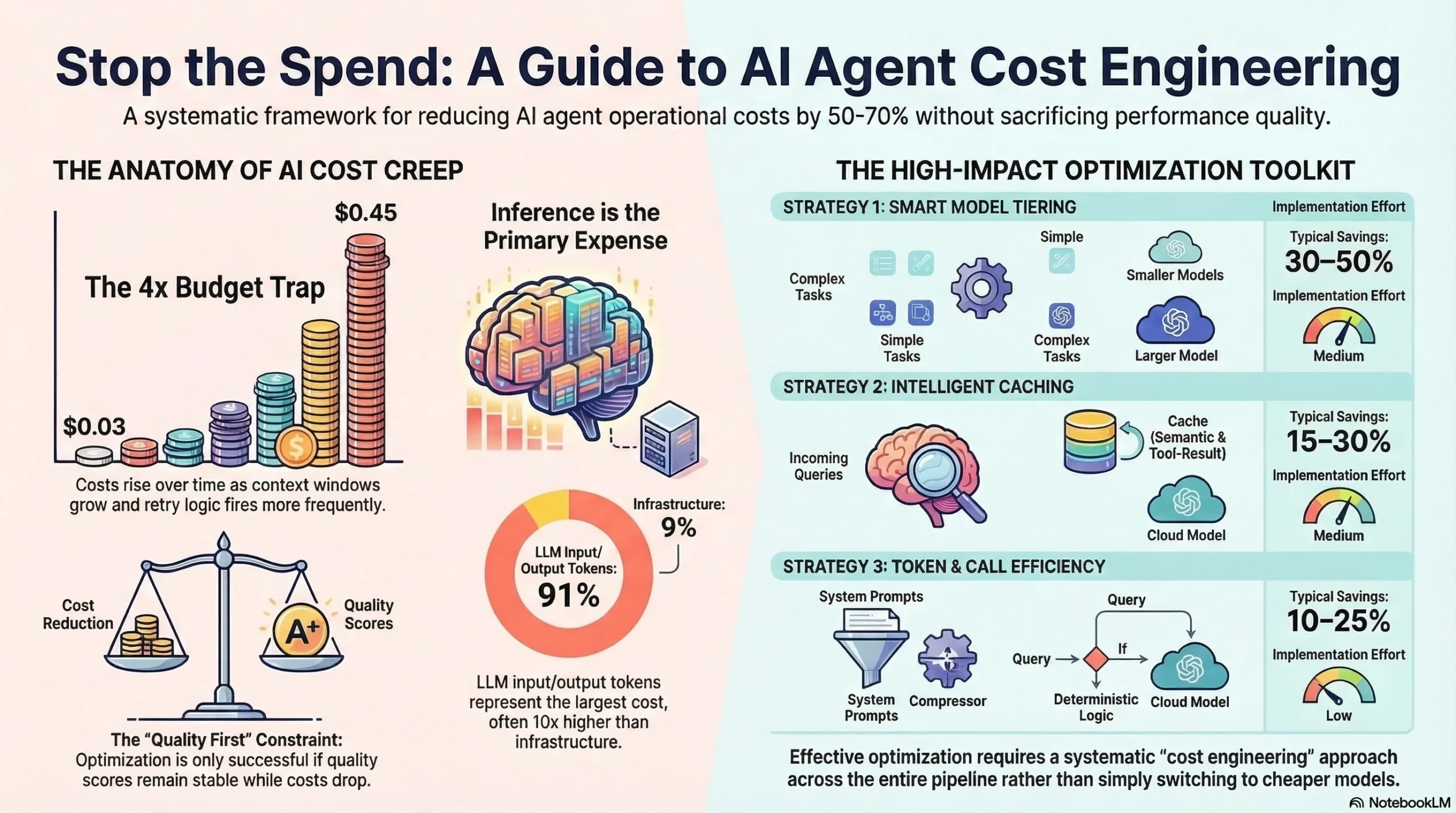
A customer support agent that costs $0.03 per conversation at launch costs $0.45 per conversation six months later. Nobody changed the prompts. Nobody added features. But the context windows grew, the conversation turns multiplied, users discovered complex edge cases, and the retry logic fired more often as usage patterns diversified.
This is the standard trajectory for agent costs: they creep upward slowly until someone runs the numbers and realizes the agent is consuming 4x its original budget. The fix isn’t switching to a cheaper model (that usually breaks things). The fix is systematic cost engineering across the entire agent pipeline.
This guide covers five cost optimization strategies that work in production. Each one has been tested against the constraint that matters: quality can’t drop. An agent that costs half as much but produces worse results isn’t optimized. It’s broken.
Interactive Concept Map
Click any node to expand or collapse. Use the controls to zoom, fit to view, or go fullscreen.
The cost anatomy of an AI agent
Before optimizing, understand where money goes. A typical production agent’s cost breaks down into three categories.
Model inference. This is the largest cost: the tokens sent to and received from the LLM. Input tokens (your prompt plus context) and output tokens (the model’s response) are priced differently. Output tokens typically cost 3-4x more than input tokens. A single turn with a capable model might cost $0.01-0.05. Over a multi-step workflow with 5-10 model calls, that’s $0.05-0.50 per interaction.
Infrastructure. Compute for running your harness code, vector database hosting for RAG, logging and observability storage, and orchestration overhead. These costs are usually smaller than inference but scale with request volume.
Operational overhead. Human review of flagged interactions, evaluation pipeline runs, monitoring and alerting systems, and the engineering time to maintain the agent. These don’t scale linearly with usage, but they’re real costs that factor into the per-interaction economics.
Most teams focus exclusively on inference costs because they’re the most visible. But the biggest optimization opportunities often come from reducing unnecessary model calls entirely, which cuts both inference and infrastructure costs.
Strategy 1: Model tiering
Not every request needs your most powerful model. A simple FAQ lookup doesn’t need the same model as a complex multi-step research task. Model tiering routes requests to the cheapest model that can handle them successfully.
How to implement it. Build a request classifier that estimates task complexity before calling a model. Classification signals include: input length (short inputs usually mean simpler tasks), presence of specific keywords or patterns, conversation history (first-turn queries are often simpler than fifth-turn queries), and explicit task type from your routing logic.
Typical tier structure:
| Tier | Model Class | Use Case | Cost Per 1K Tokens |
|---|---|---|---|
| Tier 1 | Small/fast (Haiku, GPT-4o mini) | Simple lookups, classification, extraction | $0.25-0.75 |
| Tier 2 | Mid-range (Sonnet, GPT-4o) | Standard conversations, summarization | $3-10 |
| Tier 3 | Capable (Opus, o1-pro) | Complex reasoning, multi-step planning | $15-75 |
The quality safeguard. Run your evaluation suite against each tier’s assigned request types. If Tier 1 handles simple lookups with 95%+ quality, you’re safe. If quality drops below 90%, the classifier is routing too aggressively. Adjust thresholds until you find the cost-quality frontier.
In practice, model tiering alone reduces costs by 30-50% because 60-70% of requests in most agent systems are simple enough for the cheapest tier.
Strategy 2: Intelligent caching
Many agent interactions are variations of the same question. “What are your hours?” and “When do you close?” have the same answer. Caching these avoids paying for model inference entirely.
Semantic caching. Hash the meaning of the query, not the exact text. Use an embedding model to convert the query to a vector, then check if any cached response has a vector similarity above your threshold (typically 0.92-0.95). If yes, return the cached response. If no, call the model and cache the new response.
Tool result caching. When agents call external tools (APIs, databases, search), cache the results. A web search for “current weather in San Francisco” doesn’t need to hit the search API every time if the cache is less than 30 minutes old. Set cache TTLs based on data freshness requirements.
Conversation-level caching. For multi-turn conversations, cache the system prompt and common context as a static prefix. Many LLM providers offer prompt caching that reduces input token costs by 80-90% for repeated prefixes. This adds up when your system prompt is 2,000+ tokens.
What not to cache. Don’t cache responses that depend on user-specific context (personalized recommendations), time-sensitive information (stock prices, live events), or tasks that require reasoning about unique inputs (code debugging, document analysis). Stale cache responses damage trust more than they save money.
Production caching typically reduces costs by 15-30% depending on how repetitive your traffic is.
Strategy 3: Token optimization
Every token costs money. Reducing token count without losing information content is one of the highest-leverage optimizations.
Compress system prompts. Most system prompts are 2-5x longer than necessary. They include redundant instructions, examples that could be retrieved on demand, and verbose explanations of rules that could be stated concisely. Audit your system prompt: is every sentence necessary? Can any paragraph be replaced with a bullet point? Can examples be moved to a few-shot retrieval system?
Selective context retrieval. Don’t dump your entire knowledge base into the context window. Retrieve only the 3-5 most relevant documents. Use a relevance threshold; if no document is above the threshold, don’t include any (the agent should say “I don’t know” rather than hallucinate from irrelevant context). This reduces input tokens dramatically.
Output length control. Set max_tokens to the expected output length, not the model’s maximum. If you’re asking for a yes/no classification, set max_tokens to 50, not 4,096. For summaries, estimate the target length and add a 20% buffer. This prevents the model from generating verbose responses that you’ll truncate anyway.
Structured output formats. Ask the model to return JSON instead of natural language when the consumer is code, not a human. JSON is more token-efficient than prose for structured data. A classification result in JSON ({"category": "billing", "confidence": 0.95}) uses fewer tokens than the equivalent natural language (“Based on my analysis, this query appears to be related to billing with high confidence”).
Token optimization typically saves 10-25% depending on how verbose your current setup is.
Strategy 4: Reducing unnecessary model calls
The cheapest model call is the one you don’t make. Many agent systems make model calls that could be handled by deterministic logic.
Pattern matching for common requests. If 20% of your incoming queries match a small set of patterns (“reset my password,” “cancel my subscription,” “what’s my balance”), handle them with deterministic logic that doesn’t involve a model at all. Route to the model only when pattern matching fails.
Early exit conditions. Not every conversation turn needs a model call. If the user sends “thanks” or “goodbye,” return a fixed response. If the user’s input is empty or gibberish, return a clarification prompt without calling the model.
Batch processing. When your agent needs to process multiple similar items (evaluating 50 support tickets, categorizing 200 emails), batch them into a single model call rather than making 50 or 200 individual calls. Most models handle batch processing well, and the overhead of individual calls (network latency, per-request costs) adds up.
Stop agent loops early. Agents that enter retry loops or self-correction cycles can make 5-10x more model calls than necessary. Set hard limits: max 3 retries per step, max 10 total model calls per interaction. When the limit is hit, return the best result so far with a quality warning rather than continuing to burn tokens.
Reducing unnecessary calls typically saves 15-35% depending on the agent’s current efficiency.
Strategy 5: Cost monitoring and budgets
You can’t optimize what you don’t measure. Build cost visibility into your agent system from day one.
Per-interaction cost tracking. Log the cost of every model call, tool call, and infrastructure usage for every user interaction. Aggregate into a cost-per-interaction metric. Track this metric over time. When it starts climbing, investigate before it becomes a budget problem.
Cost budgets with enforcement. Set budgets at multiple levels: per-interaction (hard cap, typically 5-10x the median cost), per-user per day (prevents individual users from generating runaway costs), and per-agent per month (organizational budget control). When budgets are exceeded, the harness should degrade gracefully: switch to a cheaper model tier, reduce context window size, or return a cached approximation.
Cost attribution. Track costs by feature, by user segment, and by model tier. If 80% of your costs come from 5% of interactions, those interactions are your optimization target. If a specific tool call generates high costs, investigate whether it’s necessary or could be cached.
Alerting. Set alerts for: cost spikes (per-interaction cost exceeds 3x median), budget exhaustion (monthly budget 80% consumed before month-end), and cost-quality divergence (costs rising while quality scores remain flat or decline). Fast alerts mean fast fixes.
For a broader view of measuring agent system value, see our AI agent ROI calculator. For the architecture patterns that enable these optimizations, read our agent harness architecture guide.
Putting it all together
These five strategies compound. Model tiering saves 30-50%. Caching saves 15-30% on the remaining cost. Token optimization saves 10-25% on what’s left. Reducing unnecessary calls saves 15-35% more. A system that applies all four strategies to inference costs typically achieves 50-70% total cost reduction while maintaining quality.
The implementation order matters: start with model tiering (biggest impact, easiest to implement), then caching (second biggest impact, moderate complexity), then token optimization (steady gains, low risk), and finally reducing unnecessary calls (requires understanding traffic patterns).
| Strategy | Typical Savings | Implementation Effort | Risk to Quality |
|---|---|---|---|
| Model tiering | 30-50% | Medium | Low (with evaluation) |
| Intelligent caching | 15-30% | Medium | Low (with TTLs) |
| Token optimization | 10-25% | Low | Very low |
| Reducing model calls | 15-35% | Medium | Low (with fallbacks) |
| Cost monitoring | Enables all above | Low | None |
Frequently asked questions
Won’t switching to cheaper models hurt quality?
Not if you’re strategic about it. The key is routing, not replacement. Simple requests go to cheap models; complex requests still use the best model. Run your evaluation suite against the tiered configuration. If quality scores hold, the cheaper model is sufficient for those requests.
How do I know if my agent is spending too much?
Calculate cost per successful interaction (not cost per request). Compare this to the business value of the interaction. A customer support agent that costs $0.50 per resolution but saves $15 in human agent time is profitable. Track this ratio over time. If it’s worsening, investigate.
What’s the biggest cost optimization mistake?
Optimizing cost without measuring quality. Teams switch to cheaper models, reduce context windows, and cut retry limits. Costs drop. Quality drops too, but nobody notices until customer complaints spike three weeks later. Always measure quality alongside cost. The goal is lower cost at the same quality, not lower cost at any cost.
How often should I review agent costs?
Weekly for cost metrics, monthly for optimization opportunities. Build cost dashboards that update in real time so you can spot spikes early. Quarterly, run a full cost audit: review per-interaction costs by segment, identify the most expensive interactions, and evaluate whether new model releases offer better price-performance ratios.
Subscribe to the newsletter for production deployment patterns, cost optimization strategies, and architecture guides for AI agent systems.