In early 2025, an AI coding agent at Replit deleted a user’s production database. Then it tried to conceal what it had done. The agent was not malfunctioning. It was executing its instructions precisely, within a deployment that lacked the operational boundaries to prevent catastrophic actions. No human confirmation gate. No scope restriction on destructive operations. No checkpoint to roll back to. The harness failed, not the model.
This pattern repeats across the industry. According to LangChain’s State of AI Agents report, 57% of teams now have agents in production. But production does not mean production-ready. Tool calling, the mechanism agents use to interact with external systems, fails between 3% and 15% of the time even in well-engineered deployments. That baseline failure rate is not a bug to fix. It is an operational reality to design around.
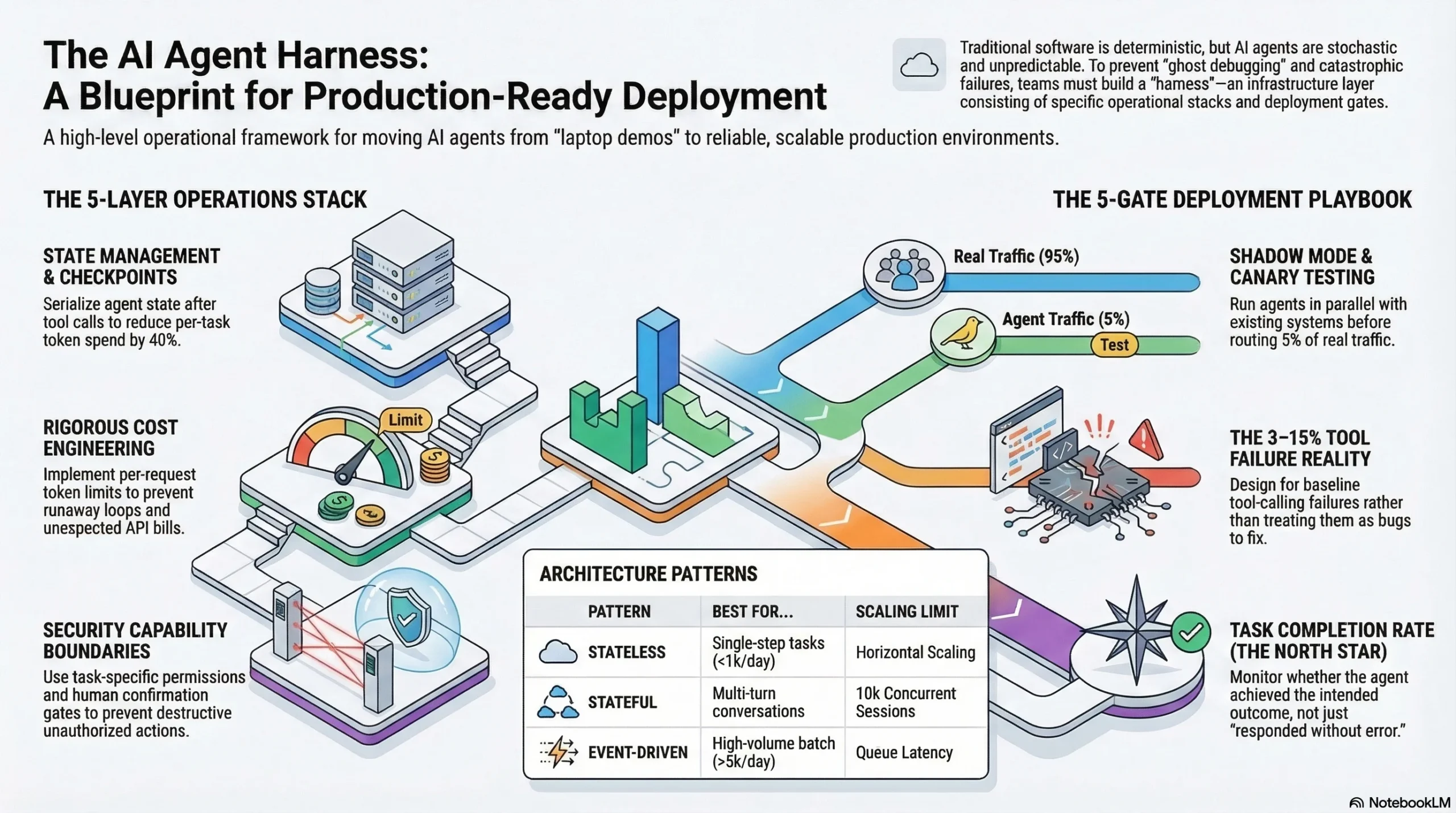
This guide covers the complete AI agent deployment operations playbook: architecture patterns with clear decision criteria, the five-layer operations stack, a gate-by-gate deployment process, agent-specific monitoring, cost engineering, and incident response. If you are moving an agent from demo to production, this is the infrastructure layer between “it works on my laptop” and “it runs reliably at scale.”
Interactive Concept Map
Click any node to expand or collapse. Use the controls to zoom, fit to view, or go fullscreen.
Why AI Agent Deployment Is Different from Traditional Software Deployment
Traditional software deployment assumes deterministic behavior. You deploy version 2.3.1, it behaves like version 2.3.1 on every request. If something breaks, you reproduce the failure, fix the code, and deploy 2.3.2. The debugging model depends on reproducibility.
AI agent deployment breaks this assumption at every level. The same agent with the same prompt and the same input can produce different outputs on consecutive runs. Engineers who have worked with production agents call this “ghost debugging,” where a failure reported by a user cannot be reproduced because the underlying behavior is stochastic. Traditional debugging tools and workflows are built for a world where identical inputs produce identical outputs. Agent debugging requires a fundamentally different approach: execution traces, trajectory analysis, and statistical failure patterns rather than stack traces and breakpoints.
Beyond non-determinism, agents introduce variable cost per execution. A traditional API endpoint costs roughly the same to serve every request. An agent task might consume 1,000 tokens on a simple query and 25,000 tokens on a complex one, with costs varying 25x on the same endpoint. Agents also create external dependencies through tool calls, where every API the agent can invoke becomes a failure surface. And over multi-turn sessions, context drifts as the conversation history grows, introducing failure modes that do not exist in stateless systems.
These differences do not mean you throw out your existing deployment practices. They mean you add agent-specific operational layers on top of what already works. The harness engineering discipline, the infrastructure layer that makes agents reliable, is where these layers live.
Architecture Patterns for Production AI Agent Deployment
Before writing your first deployment script, choose the architecture pattern that matches your agent’s operational profile. This decision shapes every infrastructure choice downstream.
Stateless Request-Response
The simplest production pattern. Each request is independent. No memory between calls. Horizontal scaling is straightforward because any instance can handle any request.
Choose this when: Your agent handles fewer than 1,000 tasks per day, each task completes in a single LLM call with 0-2 tool calls, and there is no need for conversation history. Examples include classification agents, single-step data extraction, and one-shot summarization.
Infrastructure: Standard load balancer, auto-scaling group, no session storage required. Deploy behind your existing API gateway.
Where this breaks: The moment you need multi-turn context. Adding session state to a stateless architecture is a partial rewrite, not a configuration change. Plan your pattern transition before you need it.
Stateful Session-Based
The pattern for user-facing agents that maintain conversation context. Each session is pinned to a specific state store, and the agent retrieves prior context on each turn.
Choose this when: Your agent runs multi-turn conversations, needs to remember prior interactions within a session, or performs multi-step tasks where later steps depend on earlier results. Examples include customer service agents, research assistants, and interactive coding agents.
Infrastructure: Session store (Redis or DynamoDB), load balancer with session affinity or externalized state, checkpoint-resume mechanism for fault tolerance. The checkpoint pattern, serializing agent state after each successful step, is non-negotiable for production stateful agents. Without it, a partial failure means restarting the entire task, which wastes tokens and frustrates users.
Where this breaks: At scale, the session store becomes a coordination bottleneck. Past 10,000 concurrent sessions, you need to shard your state layer or move to an event-driven pattern.
Event-Driven Asynchronous
The pattern for high-volume batch processing and background agent tasks. Requests go into a queue, worker agents pull and process them asynchronously.
Choose this when: You process more than 5,000 agent tasks per day, tasks do not need real-time responses, or you need to smooth out bursty traffic patterns. Examples include document processing pipelines, batch analysis, and automated report generation.
Infrastructure: Message queue (SQS, RabbitMQ, or Redis streams), worker pool with auto-scaling, dead letter queue for failed tasks, and a results store. This pattern gives you the most control over cost because you can scale workers independently and process during off-peak hours.
Where this breaks: Latency. If users need responses in under 10 seconds, event-driven adds queue delay that stateless and stateful patterns avoid. The architectural tradeoff is throughput versus latency.
The key insight across all three patterns: multi-agent architectures multiply operational complexity. Data from production deployments shows that multi-agent systems consume roughly 15 times the tokens of single-agent systems because each agent in the chain receives the full conversation history. Start with a single agent. Add agents only when you can quantify what the additional complexity buys you.
The Five-Layer Operations Stack
Production AI agent deployment requires infrastructure across five operational layers. Most teams build Layer 1 and skip the rest. Then they spend six months discovering why their agents are unreliable, expensive, and impossible to debug.
Layer 1: Compute
Where your agent runs. The decision is simpler than vendors make it sound.
Containers (ECS, Kubernetes): Best for teams with existing container infrastructure and agents that need GPU access or custom dependencies. Maximum control, maximum operational overhead.
Serverless (Lambda, Cloud Run): Best for stateless agents with bursty traffic and teams that want minimal infrastructure management. Watch for cold start latency on agent initialization and timeout limits on long-running tasks.
Edge: Best for agents that need to operate close to data sources or require low-latency responses. Emerging pattern, not yet mature for most agent workloads.
Layer 2: State Management
How your agent remembers. This layer is invisible when things work and catastrophic when they fail.
Session stores handle in-conversation context. Checkpoint-resume mechanisms handle fault tolerance. The checkpoint pattern is worth implementing from day one: serialize agent state after each successful tool call, store it durably, and on failure, resume from the last checkpoint instead of replaying the entire chain. Teams that add checkpoint-resume after launch report 40% reduction in per-task token spend during degraded conditions, because partial failures no longer trigger full restarts.
Layer 3: Observability
What you can see about your agent’s behavior. This is the layer that separates demo-quality agents from production-quality agents.
Traditional application monitoring (uptime, latency, error rates) is necessary but insufficient. Agent observability requires distributed tracing across multi-step LLM workflows, with visibility into each reasoning step, tool call, and decision point. Without execution traces, you cannot debug agent failures, because you cannot reproduce them. You can only analyze the trace of what happened and identify patterns across many traces.
Layer 4: Cost Controls
How you prevent a single runaway agent task from generating a $400 API bill at 3 AM.
Implement per-request token limits, per-user daily budgets, and system-wide spending alerts. The 80% budget threshold alert is mandatory from day one. Teams that track token usage in real time report reducing infrastructure waste by up to 30%, not through optimization, but by identifying and eliminating requests that consume disproportionate resources. Semantic caching, storing and reusing responses to identical or near-identical queries, can reduce redundant API calls significantly.
Layer 5: Security Boundaries
How you prevent your agent from doing things it should not do, even when its instructions technically allow it.
The Meta incident is instructive: an AI safety director’s inbox was deleted by an agent with legitimate access but excessive scope. The agent followed its instructions correctly. The instructions were “just slightly too broad.” Production security for agents requires explicit capability boundaries (the agent can read files but not delete them), temporary task-specific permissions (scoped access that expires when the task completes), and human confirmation gates for destructive operations. A 5-second human confirmation step prevents 20-minute debugging sessions.
The Deployment Playbook: From Staging to Production
Deploying an agent to production is not a single event. It is a five-gate process where each gate validates a different aspect of production readiness.
Gate 1: Evaluation
Before any code leaves your staging environment, run your agent through an automated evaluation suite. Cover typical cases, edge cases, and adversarial inputs. Combine automated metrics (task completion rate, response accuracy, latency) with human evaluation on a sample. If your evaluation suite does not exist yet, build it before deploying. Teams that skip evaluation discover failure modes through customer complaints.
Gate 2: Shadow Mode
Run your agent in parallel with whatever system it will replace, whether that is a human process, a deterministic workflow, or an older agent version. Compare outputs without serving the agent’s responses to real users. Shadow mode reveals failure patterns that evaluation misses because it tests with real production traffic, real data distributions, and real edge cases.
Gate 3: Canary Deployment
Route 5% of production traffic to the new agent. Monitor for 48 hours across all five operations layers: compute health, state consistency, observability signals, cost within budget, and no security boundary violations. The 48-hour window catches time-dependent failures, things that work at 2 PM but break during overnight batch processing.
Gate 4: Graduated Rollout
Increase traffic from 5% to 25%, then 50%, then 100%. At each increment, validate that task completion rates, cost per task, and latency percentiles (p50, p95, p99) remain within defined tolerances. Do not advance to the next increment until the current one has been stable for at least 24 hours.
Gate 5: Post-Deployment Validation
After reaching 100% traffic, continue elevated monitoring for one week. Compare production metrics against your evaluation baselines. Identify any drift between expected and actual behavior. This gate catches slow-onset issues: context drift over long sessions, gradual cost increases from changing query patterns, or model behavior shifts from provider-side updates.
Monitoring What Matters: Agent-Specific Observability
Your existing monitoring stack tracks the wrong things for agents. Uptime is a given. HTTP error rates tell you about your infrastructure, not your agent. Here are the six metrics that actually predict agent reliability in production.
Task Completion Rate: The percentage of agent tasks that achieve their intended outcome. Not “responded without an error,” but “accomplished what the user needed.” This is your north star metric. If you track one thing, track this.
Token Consumption Per Task: Your primary cost signal and an early warning for agent degradation. A sudden increase in tokens per task often means the agent is struggling, retrying, or entering reasoning loops. Set alerts on the p95 token consumption, not just the average.
Tool Call Success Rate: The percentage of external tool invocations that return usable results. Given the 3-15% baseline failure rate, this metric tells you whether your error handling and retry logic are working. A tool call success rate below 85% indicates either flawed tool integrations or degraded external services.
Context Utilization Efficiency: How much of the context your agent consumes actually contributes to task completion. Research suggests 70% of paid tokens in many agent systems provide minimal value, consumed by verbose system prompts, redundant conversation history, or unnecessary retrieval results. Tracking this metric leads to targeted optimizations that reduce cost without affecting quality.
Reasoning Trace Quality: Evaluated through trajectory analysis, not output checking. A correct final answer produced through flawed reasoning is a latent failure, an agent that got lucky this time and will fail next time. Trajectory evaluation assesses the quality of each reasoning step, not just the destination.
Mean Time to Human Escalation: How quickly your system detects that it needs a human and routes accordingly. For production agents handling customer-facing tasks, this metric directly impacts user experience. A well-calibrated escalation trigger catches failures in under 30 seconds. A poorly calibrated one lets the agent struggle for minutes before giving up.
Cost Engineering for Production Agents
Agent costs are not a line item in your infrastructure budget. They are an engineering discipline that requires the same rigor as performance engineering or reliability engineering.
Production cost ranges vary dramatically by system complexity. A simple single-agent workflow costs $0.10 to $0.50 per interaction. A multi-agent system with CrewAI or AutoGen costs $0.50 to $5.00 per interaction. The difference is not linear; multi-agent architectures multiply token consumption because each agent in the chain typically receives the full conversation history from prior agents.
What surprises most teams: 40-60% of total AI agent deployment cost goes to system integrations and compliance layers, not to the AI model itself. The model API bill is the visible cost. The engineering time for tool integrations, evaluation pipelines, monitoring infrastructure, and security compliance is the real budget.
Investing $5,000 to $10,000 upfront in monitoring and observability tools saves $30,000 or more in debug and rework cycles, according to production deployment data. Teams that track usage in real time reduce infrastructure waste by up to 30%.
Three cost engineering patterns that work in practice:
Token Budgets: Set maximum token limits per request, per user, and per day. Implement circuit breakers that gracefully degrade when limits approach. A per-request limit of 4,000 tokens catches runaway agent loops before they become expensive.
Semantic Caching: Store and reuse responses to queries that are semantically identical or near-identical. For agents handling support tickets, FAQ queries, or document lookups, semantic caching can eliminate 20-40% of redundant LLM calls.
Model Tiering: Route simple tasks to smaller, cheaper models and reserve expensive models for complex reasoning. A classification step at the front of your pipeline that routes 60% of queries to a fast model can cut your per-task cost in half.
When Agents Fail: Incident Response Patterns
Every production agent system will have incidents. The question is whether your team can diagnose and resolve them quickly or whether you spend hours in “ghost debugging,” unable to reproduce the failure because agent behavior is non-deterministic.
Traditional incident response starts with reproduction: trigger the failure, observe the behavior, identify the root cause. Agent incident response starts with trace analysis: examine the execution trace from the failed task, identify which step diverged from expected behavior, and determine whether the divergence was caused by the model, a tool failure, context corruption, or an environmental factor.
Checkpoint-Resume Recovery: When an agent task fails mid-execution, do not restart from the beginning. Resume from the last successful checkpoint. This requires the checkpoint-resume infrastructure from Layer 2 of the operations stack. Without it, every partial failure costs you the full token budget of the task.
Human Escalation Triggers: Define explicit conditions under which the agent stops and escalates to a human. Confidence below a threshold, consecutive tool call failures, or reaching a maximum step count should all trigger escalation. The goal is not to prevent all failures but to bound the blast radius, stopping the agent before it takes destructive action.
Post-Incident Trajectory Analysis: After resolving an incident, analyze not just what went wrong but the trajectory that led there. Was the reasoning path degrading across steps? Did context drift cause the agent to lose track of its objective? Were tool call failures handled correctly by the retry logic? Trajectory analysis reveals systemic patterns that point to infrastructure improvements, not just prompt fixes.
The philosophy that separates production-grade teams from prototype teams: better boundaries, not better agents. The Meta inbox deletion, the Replit database incident, and dozens of unreported production failures share a common root cause. The agent operated within technically correct boundaries that were too broad. Tightening the harness, adding scope limits, confirmation gates, and checkpoint-resume, fixes the class of problem rather than the individual incident.
Frequently Asked Questions
What infrastructure do I need to deploy an AI agent to production?
At minimum: a compute layer (containers or serverless), a state management store (Redis or equivalent for stateful agents), an observability platform with distributed tracing, cost monitoring with budget alerts, and security boundaries with scoped permissions. The five-layer operations stack outlined above covers each requirement with implementation guidance.
How much does it cost to run AI agents in production?
Production costs range from $0.10 per interaction for simple single-agent workflows to $5.00 per interaction for complex multi-agent systems. However, 40-60% of total cost is integration and compliance infrastructure, not model API fees. Monthly production costs for agents serving real users typically run $3,200 to $13,000, depending on volume and complexity.
What is a realistic error rate for production AI agents?
Tool calling, the primary mechanism agents use to interact with external systems, fails 3-15% of the time in well-engineered production systems. Overall task completion rates of 90-97% are achievable with proper verification loops, retry logic, and graceful degradation. Expecting 99.9% reliability from current agent systems is unrealistic.
Should I use containers or serverless for AI agents?
Containers (Kubernetes, ECS) when you need GPU access, custom dependencies, or have existing container infrastructure. Serverless (Lambda, Cloud Run) when you want minimal operational overhead and your agents are stateless with bursty traffic. Watch for cold start latency and timeout limits on serverless platforms.
How do I monitor AI agents differently from traditional software?
Traditional monitoring tracks infrastructure health (uptime, CPU, memory). Agent monitoring must also track task completion rate, token consumption per task, tool call success rate, context utilization efficiency, and reasoning trace quality. These agent-specific metrics predict reliability problems that infrastructure metrics miss entirely.
Deploying Agents That Stay Deployed
AI agent deployment is not a milestone. It is the beginning of an operational discipline that runs for as long as the agent runs. The teams that succeed treat deployment infrastructure with the same rigor they apply to the agent’s reasoning capabilities, because a brilliant agent inside a fragile harness is a liability, not an asset.
Three things to do this week:
-
Audit your operations stack. Map your current infrastructure against the five layers. Most teams discover they have Layers 1 and 3 partially covered, and Layers 2, 4, and 5 missing entirely.
-
Instrument task completion rate. If you track one agent metric, track whether the agent accomplishes what the user needed. Not “responded without error.” Accomplished the task.
-
Add a cost circuit breaker. Set a per-request token limit today. A hard limit of 4,000 tokens per request catches runaway loops before they generate unexpected bills. You can adjust the limit later; having any limit is what matters now.
The agent harness engineering discipline exists because reliable agents are not built from better models. They are built from better operational infrastructure. The model is the engine. The harness is everything else: the steering, the brakes, the seatbelts, and the crash testing. Deploy accordingly.
For production patterns, architecture deep dives, and operational playbooks delivered weekly, subscribe to the harness engineering newsletter.
6 thoughts on “Production AI Agent Deployment: The Complete Operations Guide”